Mac

MacBook Pro first impressions

I am writing this on a brand-spanking new Apple MacBook Pro (yes, I know, clumsy name). One of the reasons for my purchase is because I have been spending quite a bit of time in trains lately. Trains are one of the most civilized ways to travel, Caltrain certainly beats being stuck behind the wheel in the gridlock that is U.S. Highway 101. A laptop is a good way to get things done during the 3-hour round-trip to Santa Clara.

My last few laptops were company-issued Windows models. I only ever purchased two laptops before, both Macs, a PowerBook 180c in college (it sported a 68K chip, proof that Apple could have kept the PowerBook moniker on an Intel-powered machine) and one of the original white iBooks in 2001 when they first came out around the same time as Mac OS X. For the last ten years or so, I always managed to have ultra-thin and light models (less than 2kg / 4lb) assigned to me, and the MacBook Pro is certainly heavier than I would like. That said, it has a gorgeous screen and a decent keyboard.

Subjectively so far, it does not seem appreciably slower than my dual-2GHz PowerMac G5. I ran Xbench for a more objective comparison, you can see the benchmark results for more info. Unsurprisingly, the disk I/O is in the desktop’s favor, but the Core Do processor holds its own, and even beats the G5 handily on integer performance benchmarks.

I prefer desktops to laptops, for their superior capacity and peripherals. With its relatively puny 80GB of storage capacity, the laptop (it doesn’t really qualify as a notebook given its physical size) is not going to usurp the G5 soon. It doesn’t even have enough capacity to store my complete music library, for instance. I am not looking forward to the usual hassles of synchronizing two computers. Apple’s synchronization solution requires buying a $499 Mac OS X Server license, and third-party solutions are a bit thin.

Now, Apple is a designer PC company, and you want to protect the casework with a decent amount of padding, but the protective case itself must look sharp. I have always had good experience with Waterfield Designs bags made right here in San Francisco, so I naturally got one of their sleevecases. It is made of high-grade neoprene rubber rather than the foam used by other manufacturers, but in exploring my options, I couldn’t help but notice the dizzying array of choices for design-conscious Mac users. For some reason, Australian companies are over-represented, I counted no fewer than 4 manufacturers:

  • Crumpler
  • STM As for the MacBook Pro itself, it is too soon to tell. One thing you immediately notice is how hot it gets, even though the entire aluminum case should act like one big heat sink. I haven’t played with the built-in iSight yet so I can’t compare its quality with that of the stand-alone iSight I have mounted on my desktop.

    The 512MB of RAM installed are woefully inadequate for a supposedly professional machine, but I would rather not pay Apple’s grossly inflated margins on RAM compared to Crucial. I bumped it up to the full 2GB. This upper limit is kind of disappointing when you come from a 64-bit platform (my desktop has 5.5GB of RAM). Laptops benefit even more than desktops from RAM, as free RAM is automatically used as a disk cache, and reduces the need to fetch data from slow and power-hungry 2.5″ hard drives.

    Update (2006-04-05):

    Don’t try to use Monolingual to strip non-Intel architectures to save some space. You will end up rendering Rosetta unusable… I used to disable Classic, I am not sure I would go that far in only allowing Intel binaries to run on my machine.

    Update (2007-08-02):

    More Australian laptop bag manufacturers:
A Python driver for the Symbol CS 1504 bar code scanner

One of my cousins works for Symbol, the world’s largest bar code reader manufacturer. The fashionable action today is in RFID, but the humble bar code is relatively untapped at the consumer level. The unexpected success of Delicious Library shows people want to manage their collection of books, CDs and DVDs, and as with businesses, scanning bar codes is the fastest and least error-prone way to do so. Delicious Library supports scanning bar codes with an Apple iSight camera, but you have to wonder how reliable that is.

If you want something more reliable, you need a dedicated bar code scanner. They come in a bewildering array of sizes and shapes, from thin wands to pistol-like models or flat ones like those used at your supermarket checkout counter. For some reason, the bar code scanner world seems stuck in the era of serial ports (or worse, PS/2 keyboard wedges), but USB models are available, starting at $70 or so. They emulate a keyboard – when you scan a bar code, they will type in the code (as printed on the label), character by character so as to not overwhelm the application, and follow with a carriage return, which means they can work with almost anything from terminal-based applications to web pages. Ingeniously, most will allow you to program the reader’s settings using a booklet of special bar codes that perform changes like enabling or disabling ISBN decoding, and so on.

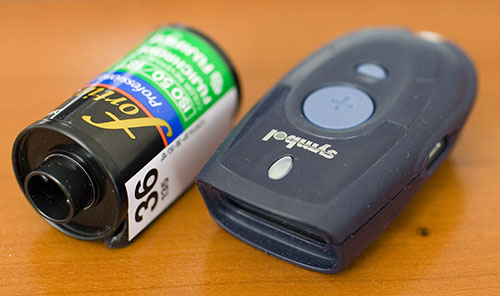
The problem with tethered bar code readers is, they are not very convenient if you are trying to catalog items on a bookshelf or read in UPC codes in a supermarket. Symbol has a unit buried deep inside its product catalog, the CS 1504 consumer scanner. This tiny unit (shown below with a canister of 35mm film for size comparison) can be worn on a key chain, although I would worry about damaging the plastic window. Most bar code readers are hulking beasts in comparison. It has a laser bar code scanner: just align the line it projects with the bar code and it will chirp once it has read and memorized the code. The memory capacity is up to 150 bar code scans with timestamps, or 300 without timestamps. The 4 silver button batteries (included) are rated for 5000 scans — AAA would have been preferable, but I guess the unit wouldn’t be so compact, but it is clear this scanner was not intended for heavy-duty commercial inventory tracking purposes.

I bought one to simplify the process of listing books with BookCrossing (even though their site is not optimized for bar code readers), but you have other interesting uses like finding out more about your daily purchases such as nutritional information or whether the company behind them engages in objectionable business practices. I can also imagine sticking preprinted bar-coded asset tracking tags on inventory (e.g. computers in the case of an IT department), and keeping track of them with this gizmo. People who sell a lot of books or used records through Amazon.com can also benefit as Amazon has a bulk listing service to which you can upload a file with barcodes. An interesting related service is the free UPC database.

Symbol CS 1504
You can order the scanner in either serial ($100) or USB ($110) versions, significantly cheaper than the competition like Intelliscanner (and much smaller to boot). I highly recommend the USB version, even if you have a serial port today — serial ports seem to be going the way of the dodo and your next computer may not have one. The USB version costs slightly more, but that’s because they include a USB-Serial adapter, and you can’t get one retailing for a mere $10. The one shipped with my unit is the newer PN50 cable which uses a Prolific 2303 chipset rather than the older Digi adapter. Wonder of wonders, they even have a

Mac OS X driver available.

The scanner ships without any software. Symbol mostly sells through integrators to corporations that buy hundreds or thousands of bar code scanners for inventory or point of sale purposes, and they are not really geared to be a direct to consumer business with all the customer support hassles that entails. There are a number of programs available, mostly for Windows, but they don’t seem to have that much by way of functionality to justify their high prices, often as expensive as the scanner itself.

Symbol does make available a SDK to access the scanner, including complete documentation of the protocol used for the device. While you do have to register, they do not make you go through the ridiculous hoops you have to pass to access to the Photoshop plug-in SDK or the Canon RAW decoding SDK. The supplied libraries are Windows-only, however, so I wrote a Python script that works on both Windows and Mac OS X (and probably most UNIX implementations as well, although you will have to use a serial port). The only dependency is the pySerial module.

By default, it will set the clock on the scanner, retrieve the recorded bar codes, correct the timestamps for any drift between the CS 1504’s internal clock and that of the host computer, and if successful clear the unit’s memory and dump the acquired bar codes in CSV format to standard output. The script will also decode ISBN codes (the CS 1504 does not appear to do this by itself in its default configuration). As it is written in Python, it can easily be extended, although it is probably easier to work off the CSV file.

The only configuration you have to do is set the serial port to use at the top of the script (it should do the right thing on a Mac using the Prolific driver, and the Windows driver seems to always use COM8 but I have no way of knowing if this is by design or coincidence). The program is still very rough, specially as concerns error recovery, and I appreciate any feedback.

A sample session follows:

ormag ~>python cs1504.py > barcodes.csv
Using device /dev/cu.usbserial...  connected
serial# 000100000003be95
SW version NBRIKAAE
reading clock for drift
clock drift 0:00:01.309451
resetting scanner clock... done
reading barcodes... done (2 read)
clearing barcodes... done
powering down... done

ormag ~>cat barcodes.csv
UPCA,034571575179,2006-03-27 01:08:48
ISBN,1892391198,2006-03-27 01:08:52

Update (2006-07-21):

At the prompting of some Windows users, I made a slightly modified version, win_cs1504.py, that will copy the barcodes to the clipboard, and also insert the symbology, barcode and timestamp starting on the first free line in the active Excel spreadsheet (creating one if necessary).

Update (2007-01-20):

Just to make it clear: I hereby place this code in the public domain.

Update (2009-11-06):

For Windows users, I have put up videos describing how to install the Prolific USB to serial driver, Python and requisite extensions, and how to use the program itself.

Update (2012-07-05):

I moved the script over to GitHub. Please file bug reports and enhancement requests there. Fatherhood and a startup don’t leave me much time to maintain this, so I make no promises, but this should allow people who make fixes to contribute them back (or fork).

Batch-changing PDF files to open in Preview on Mac OS X 10.4

Adobe Acrobat 7 is a necessary evil for some operations such as OCR, rotating or deleting pages (although as an editor PDFPen is cheaper and more useable). Acrobat has grown into a sumo of an application, with incredibly sluggish load times. If you peek under the hood, you will notice it actually has a full copy of MySQL embedded in it. I am not fond of MySQL, but it is not that bad of a database as to account for all the bloat in Acrobat, who knows what else lurks in that package?

At any rate, Acrobat is to be used as a last resort, and most definitely not the viewer of choice. Apple’s own Preview.app is far snappier and more pleasant to use (no annoying Yahoo toolbars or spurious JavaScript warnings when you have the good sense to disable a potential security hole). Acrobat insists on taking over ownership of a file once you save it, however. You could manually change the HFS creator code for each file by hand, but this is where Spotlight’s efficiently indexed metadata database shows synergy with OS X’s underlying UNIX scripting magic. The following one-liner will clear the creator code for all PDF files on your system so they open with Preview instead of Photoshop. It can easily be added to a crontab or launchd script.

mdfind ‘kMDItemCreator==“Adobe Acrobat*”’|tr “\012” “\0”|xargs -0 -n 1 /Developer/Tools/SetFile -c ‘’

If you simply want to strip the creator application from all PDF documents altogether, this script will do the trick:

mdfind ‘kMDItemKind=“Adobe PDF document” and kMDItemCreator!=""’|tr “\012” “\0”|xargs -0 -n 1 /Developer/Tools/SetFile -c ‘’

mdfind queries the Spotlight metadata for all files with a creator that starts with “Adobe Acrobat”. xargs reads arguments from standard input and passes them as command-line arguments to the SetFile utility (part of the OS X Developer Tools). tr replaces line feeds with ASCII 0 NUL characters used as argument separators when xargs is invoked with the -0 option, so embedded spaces in filenames are passed unscathed. I have tested this with Unicode file names, and they are handled correctly as well.

Thanks to Spotlight, the whole process takes only a couple of seconds on my machine, something that would not be possible if it had to scan through 300GB’s worth of files. It also goes to show that Spotlight’s apparent sluggishness when you use it from the GUI stems entirely from the overhead of the GUI struggling to progressively display search results as they are returned by the metadata index, not from the underlying database engine. There is no justification for Google searches of the entire Internet being faster than a local desktop search.

Of course, the technique can be generalized to other ownership changes for contested file formats like HTML, JPEG or TIFF.

Switch complete

Today I have officially completed my switch from Windows to the Mac for my personal stuff. The last remaining tie that bound me to the boys from Redmond was my Canon DR-2080C document scanner, which does not have drivers for Mac OS X. I have now replaced it with a Fujitsu fi-5110EOX2 and the excellent translated Japanese driver for OS X (shame on Fujitsu for not releasing the English version, despite their presence at MacWorld 2005).

My ultimate goal is the elusive paperless office. I would like to scan to PDF and shred all my paperwork, apart from that required for legal reasons like pay stubs, invoices and important documents like diplomas and property titles. Electronic documents are easier to file, faster to retrieve, backed up more reliably for disaster recovery purposes, and take far less bulk. The fact I had to reluctantly boot up my PC to scan in batches runs counter to the streamlined workflow advocated by efficiency experts like David Allen of Getting Things Done fame.

My first computer was an Apple II, the first computer I bought with my own money was a Macintosh Plus, but as I became a hard-core UNIX user, the limitations of the old Mac OS became all too apparent. I once had to write a program in Think C using low-level disk I/O primitives to do a simple task that could be handled by a shell one-liner, to batch rename TeX font files as System 6 did not have a shell or AppleScript, and I could not afford MPW back then. I decided I would not go back until Apple came up with an OS with robust UNIX underpinnings like NeXTstep. When OS X was first released, I bought an iBook, which was followed by an iMac G4 (ordered the very day it was announced, and which now serves as a video conferencing terminal at my parents’ place). The Macs were intended to be auxiliary machines, my primary home computers being a fast Windows box used for digital photography and games, and a dual-processor Solaris machine.

The PCs were in my bedroom, the iMac in my living room, as it is an elegant artifact that does not look out of place there. It also wakes up from sleep instantly, making it the ideal machine for quick web or email use. I began to notice I was increasingly using the Mac for real work, and started to evince an almost physical reluctance to boot up the Windows machine, even though the iMac was significantly slower. The noise and unreliability of the PC probably accounted for much of this (flaky ATX power supplies and motherboards). I had also never managed to get Adobe Premiere running smoothly to edit video, and iMovie+iDVD just work.

The logical next step was to upgrade to a full-featured PowerMac, which I did in June of last year. It thus took me over a year to complete the migration, despite being very knowledgeable about both platforms. The hardest items to switch were not the usual suspects like Microsoft Office — Office is fully supported on the Mac and I have a license, even though I never use it and haven’t even bothered to reinstall it after upgrading to Tiger. No, the two hardest applications to switch from were IMatch and the document scanning. Kavasoft’s amazing Shoebox has all the power of IMatch but a far superior user interface (I will post a review Real Soon Now).

What use is left for the PC? For now, games, although even this will disappear in Spring of 2006 when the HDTV-capable PlayStation 3 is released.

Ripping your CD library and building a home network

Since I moved six years ago, I keep my CDs in binders (four of them, plus one for DVDs and two for CD-ROMs) and the jewel cases in storage. I just finished ripping the first folder’s worth, about 250 CDs and SACDs in iTunes. The bulk of the time spent is actually in cleaning up inconsistent CDDB metadata and locating scans of the cover art. As I mentioned earlier, I am ripping to Apple’s lossless encoding, which is a lossless zip-style compression of the 16-bit, 44.1kHz stereo PCM CD audio stream. There is no loss of quality and my iTunes library should now be a bit-for-bit exact copy of my CD collection (or at least the third or so I have already ripped).

iTunes status

Because there is no loss of quality, I won’t have to go through the effort again, whereas if I had ripped to a lossy format like MP3 or AAC, I would need to do so again to play on my HiFi setup or if the level of compression was too high. Hard drives are cheap, and storing 250GB of music is no longer the daunting prospect it was a few years ago. Lossy formats like MP3 take detail away, rather than introducing noise, and thus it is not immediately obvious just how much damage was done, but side-by-side listening makes it clear. I always find it very amusing to read people nit-picking about subtle details of audiophile gear, and then basing their subjective judgment on testing with MP3s or (even worse) video game soundtracks played over a PC sound card.

Due to electromagnetic interference, a PC chassis is the last place you want to put quality analog audio circuitry. The way to go is to hook up a PC or Mac’s Toslink optical or SPDIF coaxial digital audio output to an external digital to analog converter (“DAC”, such as the one built into every home theater surround receiver). This situation is reminiscent of high-end CD players, where the laser pickup mechanism (“transport”) is in a different box from the DAC to improve quality. I do most of my listening from my Mac connected to my Yamaha home theater connected by Toslink, or from Sennheiser HD-650 headphones connected to a Headroom DAC and headphone amp (via USB).

There are alternatives to a direct connection, such as a Squeezebox, Apple AirPort Express, or one of the lesser devices that allow you to stream music from your computer to your amplifier via a wired or wireless local area network. WiFi may be fashionable, but I don’t recommend using it for streaming audio or video because the jitter introduced by interferences degrades sound quality.

Streaming sound over the house is of course the first step in building a home network. Market studies show most people use a home network only to share Internet access or a printer between several computers, and they haven’t yet reached even this first stage. One of the most obvious uses for home networking is remote monitoring using a webcam, but this hasn’t been marketed effectively. Remote control of TiVo is another non-contrived application, much appreciated by their users.

Given the overwhelming amount of gadgetry that clutters my tiny San Francisco-size apartment, it is natural I have a home network, entirely wired, although I do have WiFi for visitors. In an idle moment, I mapped it (PDF) as a practical exercise in using OmniGraffle instead of Visio. One conclusion I drew from a cursory analysis of it is that all the networking gear combined did not amount as much in value as my headphones alone. Home networking as a category is not going to dominate consumer electronics anytime soon…
