Network

Making the LEDs on the LincStation N2 work in Alpine

TL:DR A daemon to handle the LEDs on the LincStation N2 NAS

I normally run backups on my network on a SmartOS server equipped with 2x14TB mirrored hard drives running ZFS, using rsync and SMB/CIFS as the access protocol (and eventually Kopia). It’s a bit noisy and sluggish, despite having a 10G Ethernet connection, so I recently bought a LincPlus LincStation N2 all-flash server during its Kickstarter to eventually replace it.

The N2 is a very slim device, has 10G (copper) networking, supports 4x M2 SSDs plus 2x SATA 2.5" drives (I suppose they could be spinning rust) and a 128G MMC boot drive so you don’t have to waste data drives on the operating system. The only thing missing, really, is ECC memory.

It is supplied with a trial version of the semi-open Unraid OS, which I suppose is better than the proprietary QNAP QuTS Hero OS or the execrable btrfs-based Synology OS (Synology is beyond the pale because they are going to force their NAS appliance users to use only their own-branded and marked-up hard drives).

I know how to run a Linux system and I don’t need the limitations and hand-holding of a NAS appliance OS, so being able to install my OS of choice, in this case Alpine Linux, was non-negotiable. I managed to, after some fiddling because the device does not honor the BIOS boot settings or even boot off a USB drive until you physically remove the Unraid USB drive plugged into the first M.2 bay using pliers.

Once Alpine was installed, it was fairly smooth sailing, while the 4x4TB Lexar NM790 SSDs are throttled by only one PCIe lane each due to the limitations of the Intel N100, it’s still plenty good enough to saturate the 10Gbps Ethernet connection. My main home server (HP Z2 Mini G4) took this opportunity to die after 6 years of loyal service and the interim replacement I put in place only has 1Gbps, you can feel the difference. I have a Lenovo ThinkStation P3 Ultra on order as a permanent replacement, the only current SFF workstation available with both ECC RAM and 10G Ethernet.

One thing I noticed, however, is that all the status LEDs on the front kept flashing instead of doing so only when a drive or the network sees activity. To make this extra annoying, they are in my peripheral view in my home office. Peripheral vision is of course extremely sensitive to flicker and movement, survival traits when our ancestors in the savanna needed to be on the lookout for predators sneakily approaching. I had to do something about it.

On investigating, it seems they are SMBus devices controlled in closed-source software included on the Unraid flash drive, but also readily available on GitHub. Some reverse-engineering with strace and Hopper Disassembler showed it is written in Go, and constantly spawning subprocesses using the i2c-tools i2cget and i2cset commands, which is quite inefficient.

I first rigged up a simple shell script to just turn off all the LEDs:

#!/bin/sh
# https://gist.github.com/aluevano/ca6431f4f15d8ea62df57e67df7d4c3d

# SATA 1
i2cset -y 11 0x26 0xB0 0x04 # white off
i2cset -y 11 0x26 0xB0 0x08 # red off 
i2cset -y 11 0x26 0x52 0x00 # blinking off

# SATA 2
i2cset -y 11 0x26 0xB0 0x10 # white off
i2cset -y 11 0x26 0xB0 0x20 # red off 
i2cset -y 11 0x26 0x54 0x00 # blinking off

# Network
i2cset -y 11 0x26 0xB0 0x40 # white off
i2cset -y 11 0x26 0xB0 0x80 # red off 
i2cset -y 11 0x26 0x56 0x00 # blinking off

# NVMe 1
i2cset -y 11 0x26 0xB1 0x01 # white off
i2cset -y 11 0x26 0xB1 0x02 # red off 
i2cset -y 11 0x26 0x58 0x00 # blinking off

# NVMe 2
i2cset -y 11 0x26 0xB1 0x04 # white off
i2cset -y 11 0x26 0xB1 0x08 # red off
i2cset -y 11 0x26 0x5A 0x00 # blinking off

# NVMe 3
i2cset -y 11 0x26 0xB1 0x10 # white off
i2cset -y 11 0x26 0xB1 0x20 # red off
i2cset -y 11 0x26 0x5C 0x00 # blinking off

# NVMe 4
i2cset -y 11 0x26 0xB1 0x40 # white off
i2cset -y 11 0x26 0xB1 0x80 # red off
i2cset -y 11 0x26 0x5E 0x00 # blinking off

But this is throwing the baby with the bath water, and losing status indications. I decided to write my own replacement for the LincPlus LED daemon. To save time writing tedious C boilerplate, I asked Claude to write it for me (so am I a systems vibe coder now?). The prompts were:

  1. Using the docs at https://gist.github.com/aluevano/ca6431f4f15d8ea62df57e67df7d4c3d as a guide, write a program in C that uses SMBus/I2C to set LEDs based on disk utilization on sda, sdb, nvme0n1, nvme1n1, nvme2n1, nvme3n1 and network activity
  2. Set MAX_I2C_BUS to a higher value, on my system, the bus found is 11
  3. Use SMBus calls rather than plain I2C whenever possible

Claude did a surprisingly good job. I had to make the following adjustments for it to work properly:

  • Make it use SMBus rather than raw I2C calls to check if the bus supports the LincStation LEDs device 0x26 and avoid false positives (done using prompt 3).
  • Change the code to say utilization is 0% and not 100% if io_time is unchanged.
  • Make the network activity check only eth0, if you are running Docker or LXC, there will be other virtual or bridge interfaces that don’t actually generate outside traffic.

The most impressive thing was how it was able to reverse-engineer the gist and infer a structure to the I2C calls.

All in all, this took about 4 hours’ work including the (non AI assisted) research into how the LEDs work and some attempted reverse-engineering of the LincStation daemon using Hopper Disassembler.

Here is the result: https://github.com/fazalmajid/linstation_leds. I will probably have to make some tweaks as the network activity LED is now solidly on, due to background activity on the network.
Getting the Hasivo F1100W-4SX-4XGT switch to work

TL:DR The missing (documentation) for this otherwise fine switch

I was first exposed to Cisco network equipment in 1995, and for a long time I used their gear for my home network. Then around 2012 I switched to Juniper switches for their more sane management interface and more reasonable prices. Neither have WiFI equipment that’s really appropriate for a home setting, however, with onerous licensing terms or crackpot schizophrenic hardware like my old Cisco 877W that was one half ADSL router and one half WiFi AP (coexisting uneasily in the same physical box with separate management interfaces).

By the time I got fed up with single consumer APs, their lack of coverage and tendency to burn out within a year due to inadequate power supplies, I bit the bullet, went with the Ubiquiti Networks UniFi solution that I use to the day. At one point I considered switching to TP-Link Omada, but procrastination paid off, and I dodged a bullet.

Unfortunately, Ubiquiti doesn’t have switches with both SFP+ interfaces (for fiber optic connections) and 10G-BaseT (for copper like on my Mac Studio), other than the expensive, bulky and non-fanless Pro HD 24. While you can easily get 10G-BaseT copper SFP+ modules, the power draw of a 10G-BaseT port is actually more than the nominal power capacity of a SFP+ port and in my experience they are unreliable. For a while, I used the ZyXEL XGS1250-12, which has 3 2.5G/10G copper and one SFP+, but I would prefer a switch with more SFP+ ports.

After digging through reviews, and ServeTheHome, I found out about Hasivo switches, an inexpensive Chinese brand offering great value for money and interesting port configurations. Their F1100W-4SX-4XGT offers 4x SFP+ and 4x 2.5G/10G copper ports for £152.39 plus VAT, so I ordered one. When I received it, I plugged it into my home office Ubiquiti USW Pro Max 16 PoE with a Ubiquiti 10G DAC cable, plugged my Mac, and everything just worked as it should.

The Power and RET LEDs were flashing red and green, however. Furthermore, this is supposed to be a L3-capable switch with a Web UI, but no DHCP request or IP appeared in my UniFi console or IP address (spoiler: it’s 192.168.0.1, and DHCP is not enabled by default). The switch did not include any documentation, there is nothing available on the Hasivo site, not even in Chinese (they have documentation links, but they point to a completely different product, and even then are largely useless).

Here’s how I got it to work, using information gleaned from various Internet forums:

  1. First, get a Cisco-style RJ45 serial console cable like the Cable Matters one, hook it to the Console port on the Hasivo.
  2. Start a terminal session, in my case on Linux:
chown uucp:uucp /dev/ttyUSB0
cu -l /dev/ttyUSB0 -s 38400
  1. The login is admin and the password is admin

  2. The terminal console UI is a knockoff of the Cisco IOS CLI:

    1. enable to enter administrator mode
    2. conf t to enter configuration mode
    3. interface vlan1 to configure the admin interface
    4. ip address 10.254.254.115/8 (or whatever you want it to be)
    5. exit to go back to the interface level
    6. exit to go back to the global config level
    7. show interface brief to verify the config was applied correctly
    8. copy running-config startup-config to make the changes persistent
  3. You can now point your web browser to http://10.254.254.115/

Some braver people than myself are attempting to get OpenWRT running on the switch, but they doesn’t seem to have succeeded yet.

Fiber for your home network

TL:DR Fiber as the backbone of your home network is easier than you’d think

My apartment, like many, is elongated. The living room is on one end, the bedrooms (one of which is my home office), on the other side. This makes it hard to cover both sides with a single WiFi access point, or to have uniform Internet access speed on the wired network. I have a semi-pro Ubiquiti UniFi network of WiFi access points and switches, which makes it realtively easy, but only if you have good backhaul connectivity between the APs.

For the longest time I used G.hn powerline networking bridges made by Devolo. Unfortunately, powerline is at least as unreliable as wireless networking and this made for frequent brown-outs requiring unplugging the Devolo Magic 2 boxes to power-cycle them. I know Devolo doesn’t make the actual PLC controllers and their firmware, probably made by Broadcom from the MAC addresses, but surely they could implement something as simple as a watchdog timer to reboot the PLC if no heartbeats are seen in a while?

At any rate, at some point I flipped the bozo switch on the Devolos and decided it was long past time to install proper Ethernet across the two halves of the apartment, which is easier said than done in a rental. To make things more complex, my Internet connection that used to be absymal Vodafone/BT OpenReach VDSL ending in my office was upgraded to a fiber ISP but this terminated by the door in half-way no-man’s land.

This was around the time I was experimenting with 10G Ethernet in the core of my home network, using Ubiquiti’s relatively inexpensive (for the time) USW-Aggregation switches with 8 SFP+ 10G ports. Speaking of which, while you can buy 10GBase-T SFP+ modules allowing you to use copper 10G Ethernet like the one on my Mac Studio, their power draw exceeds the specs of the SFP+ standard and they are unreliable, stick with fiber or use a switch with actual 10G ports (in my case a ZyXEL XGS1250-12, although it has an unfortunate tendency to overheat).

Contrary to what you may think, multimode fiber is much thinner (thus more discreet) and far more flexible than copper Ethernet cable (fiber above in the picture, copper below).

Fiber and copper cable compared

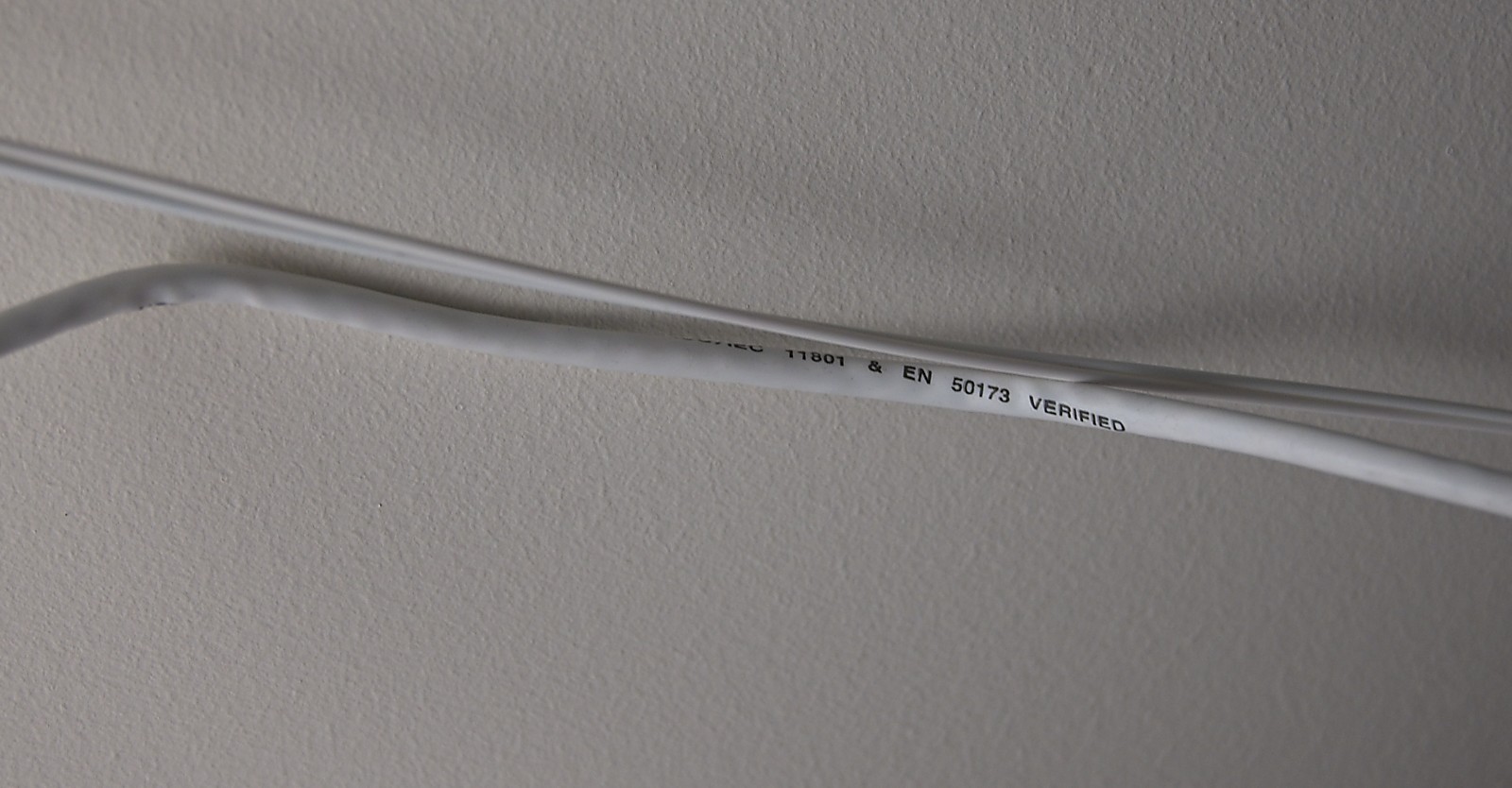
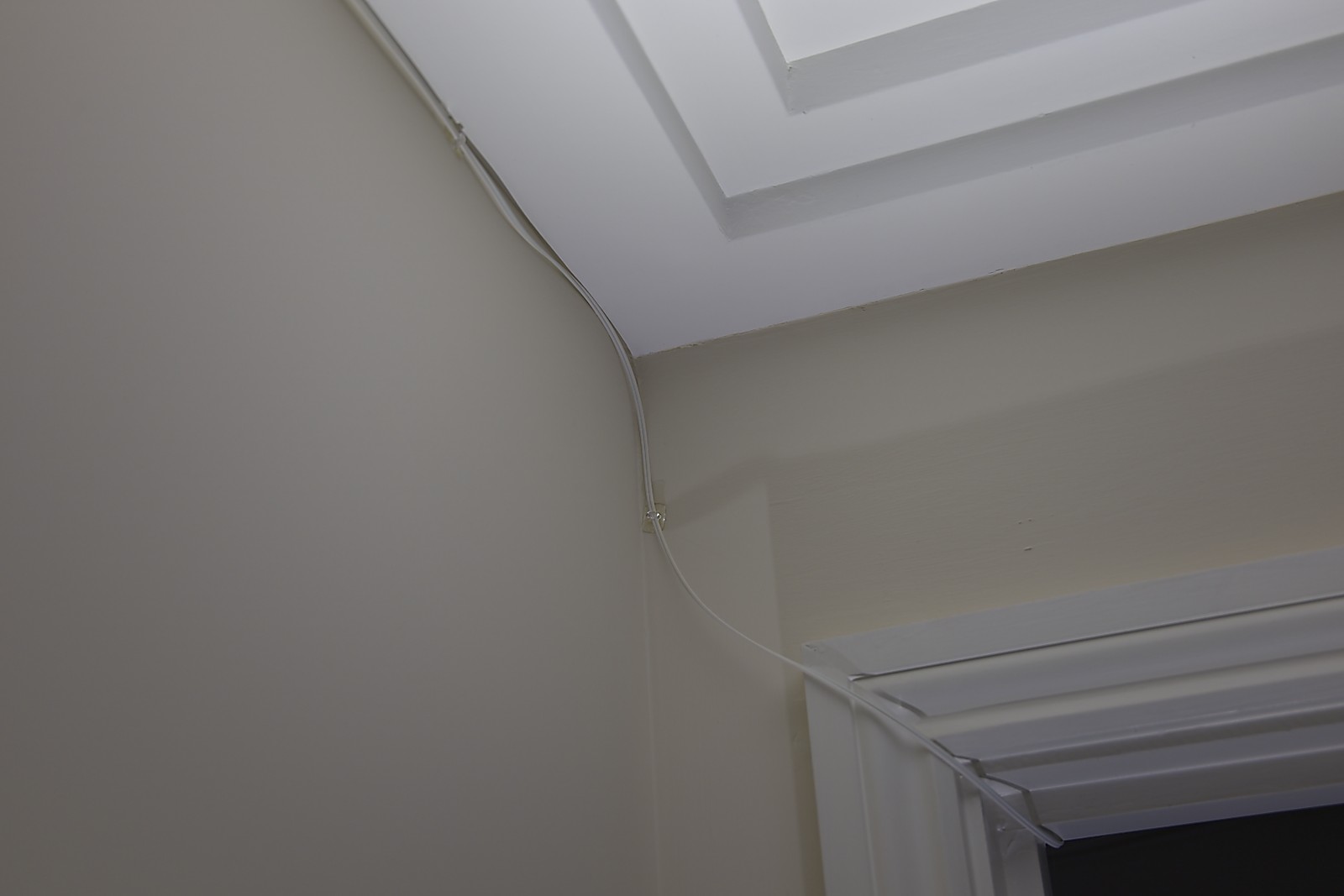
I conceived the idea of running a 30m pre-terminated fiber cable, made by a French company, as it turns out, along the crown molding in the ceiling, held in place with transparent plastic 3M Command hooks originally meant for holding Christmas lights, and easily removed without damage to the paintwork (this is a rental, remember).

Fiber cable on the ceiling

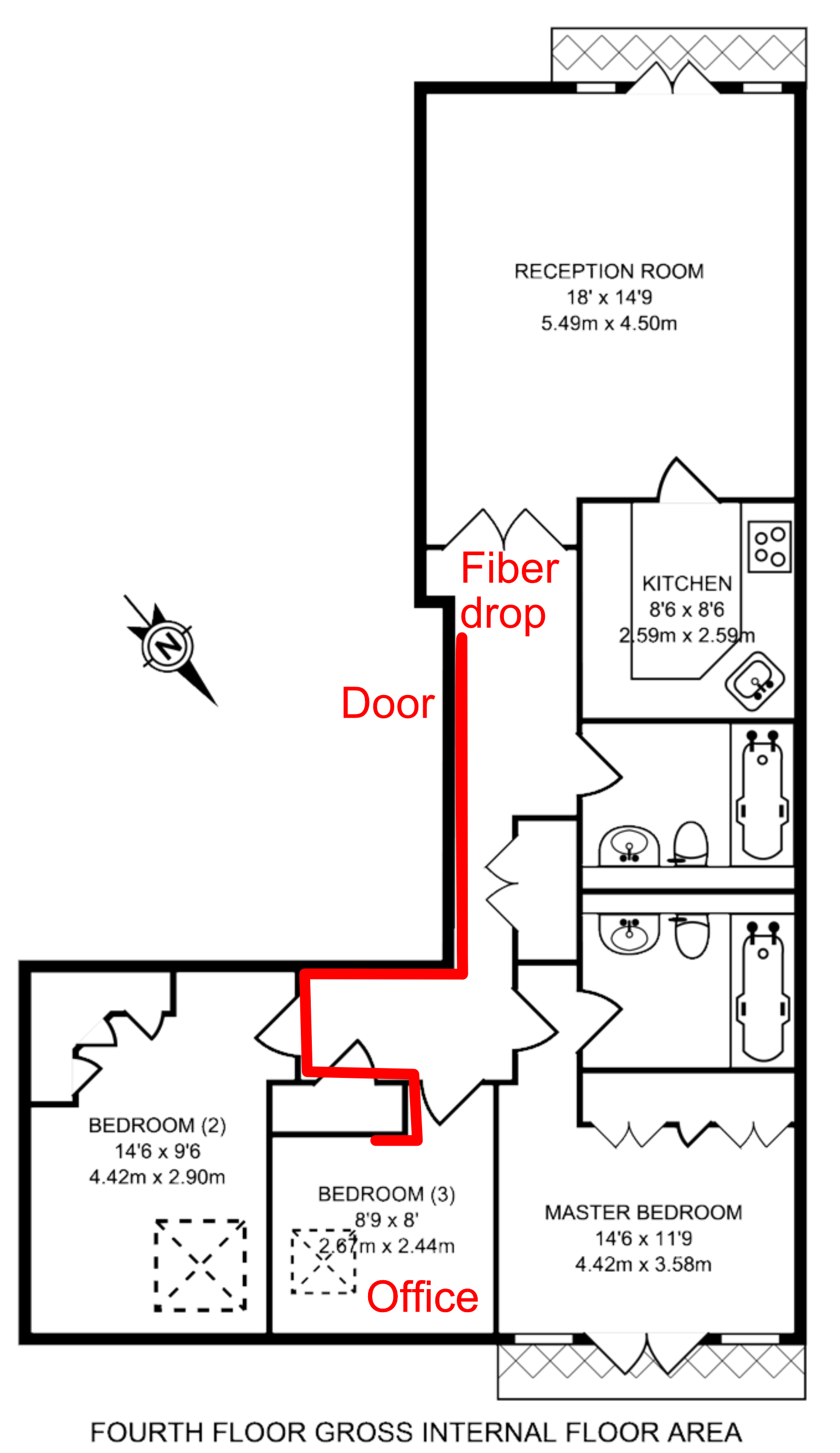
I had to run it along a snaking route in red to stay along the crown molding, but even with my tyro DIY skills it only took a couple of hours to set up and is barely visible unless you know to look for it. While I don’t actually have any 10G devices in my living room yet, I do have a WiFi7 access point and it won’t be bottlenecked by the Ethernet network.

Floor plan

I still have a Devolo link between my office and the AP in my bedroom, but that’s a much shorter distance and much less unreliable.

The sad story of AIA Chasing

TL:DR Work-around for misconfigured HTTPS servers

This morning Temboz warned me that it had suspended The Oatmeal’s RSS feed due to too many errors. On further investigation, it turns out Temboz was getting these OpenSSL errors:

{'bozo': True,
 'bozo_exception': URLError(SSLCertVerificationError(1,
   '[SSL: CERTIFICATE_VERIFY_FAILED] certificate verify failed: unable
   to get local issuer certificate (_ssl.c:997)')),
 'entries': [],
 'feed': {'summary': ''},
 'headers': {}}

But oddly enough the site (and its RSS feed) were loading perfectly fine in Vivaldi, Firefox or Safari, and their certificate trust path displaying properly.

Trying to fetch the site directly using the openssl command-line tool revealed the root cause of the problem: the server is misconfigured and sending only the first certificate, not the full path.

zbuild ~/build>openssl s_client -connect www.theoatmeal.com:443 < /dev/null 
CONNECTED(00000003)
depth=0 CN = theoatmeal.com
verify error:num=20:unable to get local issuer certificate
verify return:1
depth=0 CN = theoatmeal.com
verify error:num=21:unable to verify the first certificate
verify return:1
depth=0 CN = theoatmeal.com
verify return:1
---
Certificate chain
 0 s:CN = theoatmeal.com
   i:C = US, O = "DigiCert, Inc.", CN = RapidSSL Global TLS RSA4096 SHA256 2022 CA1
   a:PKEY: rsaEncryption, 2048 (bit); sigalg: RSA-SHA256
   v:NotBefore: Jul 19 00:00:00 2022 GMT; NotAfter: Jul 21 23:59:59 2023 GMT
---
Server certificate
-----BEGIN CERTIFICATE-----
MIIHnjCCBYagAwIBAgIQDShn/5d79/AKJLby4Rc9BzANBgkqhkiG9w0BAQsFADBc
MQswCQYDVQQGEwJVUzEXMBUGA1UEChMORGlnaUNlcnQsIEluYy4xNDAyBgNVBAMT
... (elided for clarity) ...
jxgimUVPjChZSSpf5+wu9TdZDMTpdOneWsxgDJL6fzqJgw==
-----END CERTIFICATE-----
subject=CN = theoatmeal.com
issuer=C = US, O = "DigiCert, Inc.", CN = RapidSSL Global TLS RSA4096 SHA256 2022 CA1
---
No client certificate CA names sent
Peer signing digest: SHA256
Peer signature type: RSA
Server Temp Key: ECDH, prime256v1, 256 bits
---
SSL handshake has read 2644 bytes and written 448 bytes
Verification error: unable to verify the first certificate
---
New, TLSv1.2, Cipher is ECDHE-RSA-AES256-GCM-SHA384
Server public key is 2048 bit
Secure Renegotiation IS supported
Compression: NONE
Expansion: NONE
No ALPN negotiated
SSL-Session:
    Protocol  : TLSv1.2
    Cipher    : ECDHE-RSA-AES256-GCM-SHA384
    Session-ID: 50D50D930B6256AE492D1F764C2C873C6AFA6198BB4A8D544C57DC2B198E74B2
    Session-ID-ctx: 
    Master-Key: 034F81BED2AEB74AD5A7A145C3C36F2D94BFECEA4D58A87F24C8390F924E041E40CD7C9C7F480EDAA8573A1EDAA499B1
    PSK identity: None
    PSK identity hint: None
    SRP username: None
    TLS session ticket lifetime hint: 300 (seconds)
    TLS session ticket:
    0000 - e0 73 37 67 02 17 57 4e-f5 62 de 0a bd f7 2b 47   .s7g..WN.b....+G
    ...(elided for clarity) ...
    00b0 - 46 0a 22 1f 3e 4d 31 c8-92 3f ff 18 20 d8 b3 15   F.".>M1..?.. ...

    Start Time: 1663757669
    Timeout   : 7200 (sec)
    Verify return code: 21 (unable to verify the first certificate)
    Extended master secret: no
---
DONE

The certificate chain has only one certificate instead of the expected 3 (server, intermediate, root).

It’s not just a Python thing, curl compiled from source also fails, but the one shipped by Apple accepts it:

fafnir ~>/usr/local/bin/curl https://www.theoatmeal.com/
curl: (60) SSL certificate problem: unable to get local issuer certificate
More details here: https://curl.se/docs/sslcerts.html

curl failed to verify the legitimacy of the server and therefore could not
establish a secure connection to it. To learn more about this situation and
how to fix it, please visit the web page mentioned above.

fafnir ~>/usr/bin/curl https://www.theoatmeal.com/
<!DOCTYPE html>
<html lang="en">
<!--
    -\-                                                     
    \-- \-                                                  
     \  - -\                                                
      \      \\                                             
       \       \                                            
        \       \\                                              
         \        \\                                            
         \          \\                                        
         \           \\\                                      
          \            \\                                                 
           \            \\                                              
           \. .          \\                                  
            \    .       \\                                 
             \      .    \\                                            
              \       .  \\                                 
              \         . \\                                           
              \            <=)                                         
              \            <==)                                         
              \            <=)                                           
               \           .\\                                           _-
               \         .   \\                                        _-//
               \       .     \\                                     _-_/ /
               \ . . .        \\                                 _--_/ _/
                \              \\                              _- _/ _/
                \               \\                      ___-(O) _/ _/ 
                \                \                  __--  __   /_ /      ***********************************
                \                 \\          ____--__----  /    \_       I AM A MOTHERFUCKING PTERODACTYL
                 \                  \\       -------       /   \_  \_     HERE TO PTERO-YOU A NEW ASSHOLE
                  \                   \                  //   // \__ \_   **********************************
                   \                   \\              //   //      \_ \_ 
                    \                   \\          ///   //          \__- 
                    \                -   \\/////////    //            
                    \            -         \_         //              
                    /        -                      //                
                   /     -                       ///                  
                  /   -                       //                      
             __--/                         ///
  __________/                            // |               
//-_________      ___                ////  |                
        ____\__--/                /////    |                
   -----______    -/---________////        |                
     _______/  --/    \                   |                 
   /_________-/       \                   |                 
  //                  \                   /                 
                       \.                 /                 
                       \     .            /                 
                        \       .        /                  
                       \\           .    /                  
                        \                /                  
                        \              __|                  
                        \              ==/                  
                        /              //                   
                        /          .  //                    
                        /   .  .    //                      
                       /.           /                       
                      /            //                       
                      /           /
                     /          //
                    /         //
                 --/         /
                /          //
            ////         //
         ///_________////


-->

Apple uses its own Secure Transport library in curl, which must implement AIA because mainline curl still has AIA on its TODO as of 2021-09-21.

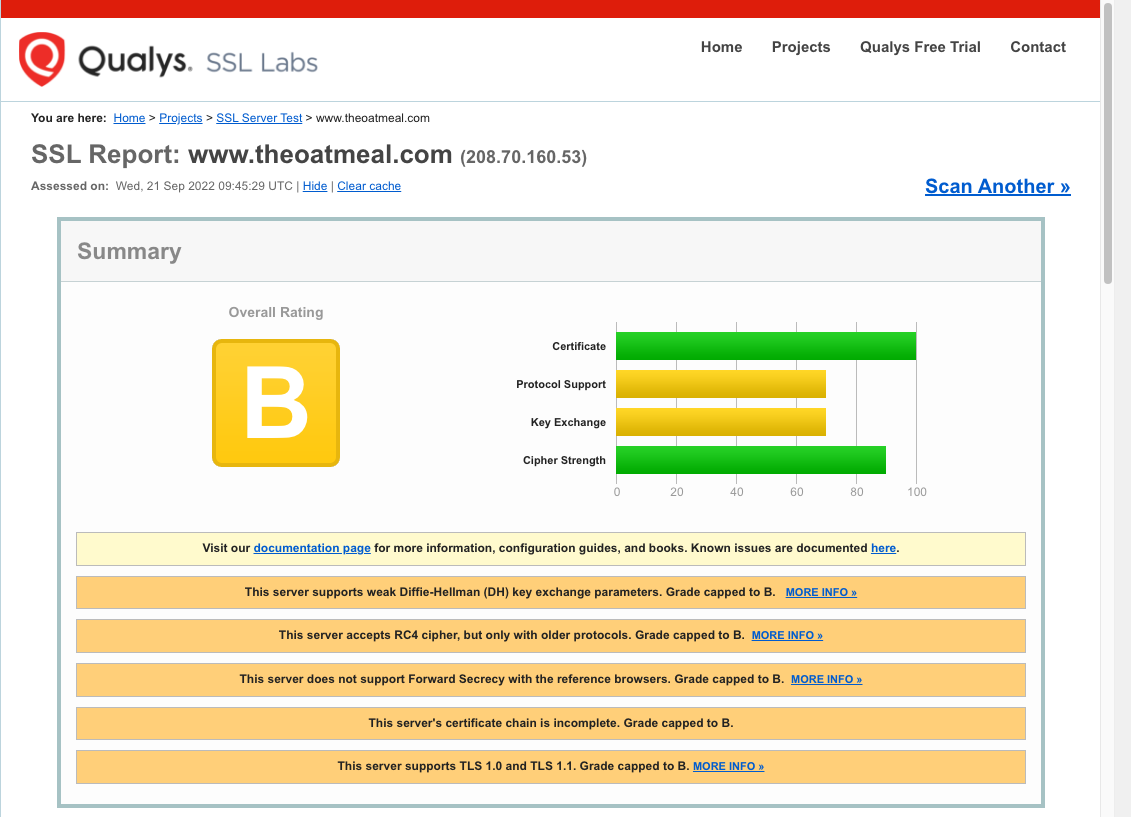
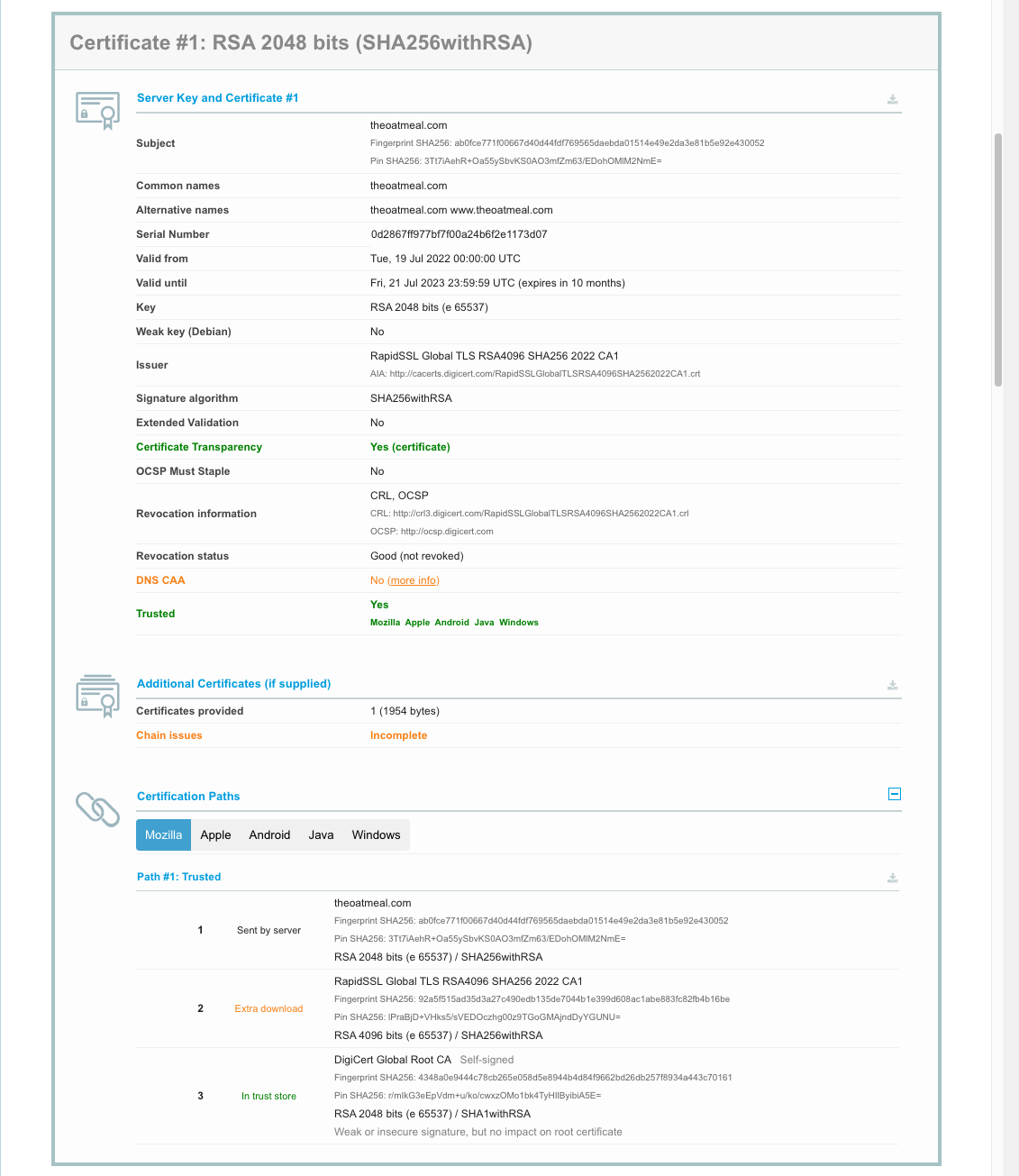
SSL Labs’ server test tool confirmed this:

So how do the browsers manage despite lacking the full chain? They use a work-around called Authority Information Access fetching (usually shortened to AIA fetching or AIA chasing). The server certificate has an optional X.509 field that has a URL to fetch the next certificate, in this case:

zbuild ~/build>openssl s_client -connect www.theoatmeal.com:443 < /dev/null | openssl x509 -text -noout
depth=0 CN = theoatmeal.com
verify error:num=20:unable to get local issuer certificate
verify return:1
depth=0 CN = theoatmeal.com
verify error:num=21:unable to verify the first certificate
verify return:1
depth=0 CN = theoatmeal.com
verify return:1
DONE
Certificate:
    Data:
        Version: 3 (0x2)
        Serial Number:
            0d:28:67:ff:97:7b:f7:f0:0a:24:b6:f2:e1:17:3d:07
        Signature Algorithm: sha256WithRSAEncryption
        Issuer: C = US, O = "DigiCert, Inc.", CN = RapidSSL Global TLS RSA4096 SHA256 2022 CA1
        Validity
            Not Before: Jul 19 00:00:00 2022 GMT
            Not After : Jul 21 23:59:59 2023 GMT
        Subject: CN = theoatmeal.com
        Subject Public Key Info:
            Public Key Algorithm: rsaEncryption
                Public-Key: (2048 bit)
                Modulus:
                    00:ad:01:37:58:d7:6a:f8:32:a0:26:c9:fd:8f:f3:
                    ... (elided for clarity) ...
                    7e:ef:cd:17:14:dc:55:d4:ff:a9:66:c4:96:57:02:
                    ca:a1
                Exponent: 65537 (0x10001)
        X509v3 extensions:
            X509v3 Authority Key Identifier: 
                F0:9C:85:FD:A2:9F:7D:8F:C9:68:BB:D5:D4:89:4D:1D:BE:D3:90:FF
            X509v3 Subject Key Identifier: 
                19:35:30:10:7D:D9:89:64:B5:A6:53:2C:76:6F:51:37:3B:2B:08:1C
            X509v3 Subject Alternative Name: 
                DNS:theoatmeal.com, DNS:www.theoatmeal.com
            X509v3 Key Usage: critical
                Digital Signature, Key Encipherment
            X509v3 Extended Key Usage: 
                TLS Web Server Authentication, TLS Web Client Authentication
            X509v3 CRL Distribution Points: 
                Full Name:
                  URI:http://crl3.digicert.com/RapidSSLGlobalTLSRSA4096SHA2562022CA1.crl
                Full Name:
                  URI:http://crl4.digicert.com/RapidSSLGlobalTLSRSA4096SHA2562022CA1.crl
            X509v3 Certificate Policies: 
                Policy: 2.23.140.1.2.1
                  CPS: http://www.digicert.com/CPS
            Authority Information Access: 
                OCSP - URI:http://ocsp.digicert.com
                CA Issuers - URI:http://cacerts.digicert.com/RapidSSLGlobalTLSRSA4096SHA2562022CA1.crt
            X509v3 Basic Constraints: 
                CA:FALSE
            CT Precertificate SCTs: 
                Signed Certificate Timestamp:
                    Version   : v1 (0x0)
                    Log ID    : AD:F7:BE:FA:7C:FF:10:C8:8B:9D:3D:9C:1E:3E:18:6A:
                                B4:67:29:5D:CF:B1:0C:24:CA:85:86:34:EB:DC:82:8A
                    Timestamp : Jul 19 17:18:02.819 2022 GMT
                    Extensions: none
                    Signature : ecdsa-with-SHA256
                                30:46:02:21:00:E8:D0:A9:EB:65:7D:19:73:9A:BC:F8:
                                0B:6D:30:FD:DB:47:83:79:D5:43:0C:92:00:1C:BF:E5:
                                E9:58:F2:B8:0E:02:21:00:8C:C1:69:33:FB:97:F4:E3:
                                A5:4A:8A:FD:AB:7E:E7:B9:17:0E:95:EF:BC:27:41:CE:
                                6C:EA:86:57:13:94:ED:C4
                Signed Certificate Timestamp:
                    Version   : v1 (0x0)
                    Log ID    : 35:CF:19:1B:BF:B1:6C:57:BF:0F:AD:4C:6D:42:CB:BB:
                                B6:27:20:26:51:EA:3F:E1:2A:EF:A8:03:C3:3B:D6:4C
                    Timestamp : Jul 19 17:18:02.762 2022 GMT
                    Extensions: none
                    Signature : ecdsa-with-SHA256
                                30:45:02:20:31:CC:04:98:48:B2:61:9C:66:7E:88:18:
                                06:08:30:72:E6:A7:F8:1C:9C:C6:65:BB:80:EF:41:F6:
                                E9:A3:3E:26:02:21:00:C6:3A:AB:5E:00:0C:DF:4B:E5:
                                70:39:3E:B6:2D:60:DF:9D:A0:DA:DE:A1:56:C4:87:D7:
                                49:EB:AF:BF:6F:3D:86
                Signed Certificate Timestamp:
                    Version   : v1 (0x0)
                    Log ID    : B3:73:77:07:E1:84:50:F8:63:86:D6:05:A9:DC:11:09:
                                4A:79:2D:B1:67:0C:0B:87:DC:F0:03:0E:79:36:A5:9A
                    Timestamp : Jul 19 17:18:02.824 2022 GMT
                    Extensions: none
                    Signature : ecdsa-with-SHA256
                                30:46:02:21:00:E3:D4:CF:BF:D0:8A:C5:BC:A6:28:F8:
                                49:87:75:F7:6B:A7:9B:21:7F:DB:6A:E6:69:C1:EC:D8:
                                F7:52:D7:4B:EA:02:21:00:E8:45:9A:7E:7E:2A:A6:EA:
                                64:96:60:95:1D:54:DE:2A:2F:3E:5F:25:C4:9E:02:2E:
                                0A:D1:6C:1F:93:17:51:EB
    Signature Algorithm: sha256WithRSAEncryption
    Signature Value:
        7d:35:f0:0a:96:36:17:4d:de:7b:95:14:5b:67:9d:b5:f5:27:
        ... (elided for clarity) ...
        60:0c:92:fa:7f:3a:89:83

In this case the browser will fetch http://cacerts.digicert.com/RapidSSLGlobalTLSRSA4096SHA2562022CA1.crt and recursively until it has the complete chain.

zbuild ~/build>curl -s --output - http://cacerts.digicert.com/RapidSSLGlobalTLSRSA4096SHA2562022CA1.crt | openssl x509 -text -noout | ggrep -A 2 "Authority Information Access:"
            Authority Information Access: 
                OCSP - URI:http://ocsp.digicert.com
                CA Issuers - URI:http://cacerts.digicert.com/DigiCertGlobalRootCA.crt

and http://cacerts.digicert.com/DigiCertGlobalRootCA.crt resolves to a root certificate with no AIA but in the trust store.

Since The Oatmeal’s site may not remain broken forever (I have reported the issue to Inman), I created a site https://aia.majid.org/ deliberately broken to not include a full certificate chain, for testing purposes.

PSA: iCloud Private Relay can make Safari on your iPad unusable

After upgrading my iPad to iPadOS 15.5, Safari became unusable. It would take forever to load the Reddit login page, and many others like Dilbert.com. Opening the same in Firefox Focus had no issues.

Going into Settings / Safari / Privacy & Security / Hide IP Address and disabling it fixed this for me. Alternatively you can disable it only for specific networks (Settings / Wi-Fi / ⓘ / Limit IP Address Tracing / Off).

It seems Apple turned on iCloud Private Relay on by default for Safari in iPadOS 15.5 and presumably iOS 15.5 as well. Macs are probably next.

I can only speculate why turning it off fixes the breakage, but:

  • The feature routes your calls through Akamai then CloudFlare, and for whatever reason CloudFlare doesn’t seem to like my ISP, I often encounter their “prove you are human” challenges.
  • It may also be because Apple overrides your DNS settings for this feature to work, and if your network is locked down with something like Pi-Hole to prevent trackers, those DNS requests may not be getting through. I don’t want IoT devices or the like to bypass my DNS server, which uses Wireguard to my Cloud VPN server to ensure my ISP cannot snoop on my DNS requests (a setup I believe more secure and private than Apple’s), nor CloudFlare, nor the UK Police State. I haven’t blocked DNS-over-HTTPS servers yet as this guy does but it’s on my list. This might be interfering with iCloud Private Relay.
  • It may also be sabotage, as Rui Carmo points out, or as John Oliver memorably calls it, “Cable Company F∗∗∗ery”.