Mac

MacWorld SF roundup

I work a mere four blocks away from the Moscone Center, where the annual MacWorld SF trade show is held, so naturally I just drift there during my lunch break, possibly extended… Here is a list of strange and wonderful things I saw during the show, and that might have been overlooked by the more mainstream sites:

iLugger

The iLugger is a carrying case for the iMac G5 (it fits both the 17″ and 20″ models). Most laptops are always connected to the mains and seldom used as real mobile devices, and an iMac G5 will give significantly better performance at 2/3 the price of a PowerBook. Interestingly, the company making it is a blimp manufacturer, clearly a case of someone scratching their own itch.

Epson RD-1

Epson repNot a new product, but I got to handle an Epson R-D1, a limited edition Leica M compatible rangefinder digital camera (the only one of its kind) based on a Voigtländer-Cosina Bessa R2 body. I shot a few samples with a 50mm Summicron and Noctilux, and the resulting pictures are remarkable clear and sharp. Noise levels at ISO 800 are significantly better than my Canon EOS 10D, no small feat, and given a rangefinder’s 2-3 stop advantage over a SLR, this looks like an ideal available-light camera.

The Bessa R2 has a relatively short rangefinder base length, which reduces its focusing accuracy compared to a Leica. The hardest lens to focus is the Noctilux-M 50mm f/1.0 (yes, you read that right, the fastest production lens in the world), due to its very shallow depth of field at low aperture, as shown in the picture to the left. I took it with a Noctilux (ISO 200, f/1.0, 1/125) at close to its minimum distance of 1 meter, and focusing accuracy seems adequate… Click on the image for the full-size JPEG with EXIF metadata (not including the manually set aperture and focus, of course). For comparison purposes, here is the corresponding JPEG I shot yesterday (ISO 800, Summicron-M 50mm f/2, 1/30, aperture unrecorded, probably f/4).

The gentleman portrayed is an Epson representative who was apparently given the charge of watching over this $3000 camera (apparently his only task). The sight of me pawing over it might explain his expression…

I won’t duplicate Luminous Landscape’s review, and didn’t have that much time to play with the RD-1 in any case. Build quality is good, as good as the 10D at least. It does not have the satisfying heft of my Leica MP, nor its superlative 0.85x viewfinder, but then again what does? Some retro touches like the dials are an affectation, as well as the manually cocked shutter. The shutter cocking lever does not have to advance film, and its short travel feels somewhat odd.

X-Rite Pulse ColorElite

X-Rite, a maker of color calibration hardware, was demonstrating its Pulse ColorElite bundle, resulting from its acquisition of the color management software vendor Monaco Systems. This package allows you to calibrate with precision the color characteristics of a monitor, scanner, digital camera and printer, for consistent, professional-grade color management. It goes much beyond simple and now relatively inexpensive monitor calibration colorimeters, by also using a spectrophotometer (an instrument that measures light across the visible spectrum, wavelength by wavelength), and the price is correspondingly higher. The market-leading product is the GretagMacbeth Eye-One Photo. X-Rite has clearly replicated the Eye-One package, but at a slightly lower price, and with some nice touches that significantly improve usability. The Eye-One spectrophotometer (which is used both for calibrating monitors and prints, a GretagMacbeth patented technology) is reportedly more accurate, however (3nm vs. 20nm). The Pulse bundle retails for $1300, the Eye-One for $1400.

FrogPad

The FrogPad is a small one-handed Bluetooth keyboard designed to be used with PDAs or smartphones, but it can also be used with a Mac or PC as it follows the standard Bluetooth Human Interface Device (HID) profile. You can hold it in one hand and type with the other. I don’t know how long it takes to get used to it, but at any rate they are offering $50 off the regular price of $179 if you use the code Apple50. They also has a mockup of a folding version in cloth, for use in wearable computing.

Interwrite Bluetooth tablet

CalComp used to make high-end tablets and digitizers for architects, engineers and artists. The tablet market is pretty much monopolized by Wacom, nowadays, but CalComp is still around (after being bought out by GTCO). They were demonstrating a Bluetooth tablet for use by teachers in a classroom setting (although I am not sure how many cash-strapped school districts can afford the $800 device).

JetPhoto

There was a cluster of small Chinese companies exhibiting. One of the more interesting was Atomix, a company that makes JetPhoto, a digital photo asset management database, similar to Canto Cumulus or Extensis Portfolio. Apparently, their forte is the integration of GPS metadata and the image database, you can do geographical selections on a map to find photos. It also had many export functions with a comprehensive database of cell phones and PDAs to export photos to. Unfortunately, the current version does not support sophisticated hierarchical, set-oriented categories, the one feature in IMatch I find absolutely vital.

The program looked impressively polished for a first version, and is available free to download for now. This is yet another illustration of how the Chinese are rapidly advancing up the value chain, and American firms could be in for a nasty surprise if they maintain the complacent belief high-end jobs are their birthright and only unqualified manufacturing jobs or menial IT tasks are vulnerable to Chinese (or Indian) competition.

Fujitsu ScanSnap

One of the few things I still use my Windows game console PC for is to drive my Canon DR-2080C document scanner. This small machine, the size of a compact fax machine, can scan to PDF 20 pages per minute (and it can scan both sides simultaneously). It is intended for corporate document management, but is also very useful to tame the paper tiger by batch-converting invoices, bills and so onto purely electronic form, in a way that is not practical using a flatbed scanner.

It seems Fujitsu is bringing that functionality to the Mac with the similarly specified ScanSnap fi-5110EOX. The scanner is driven with a bundled version of Adobe Acrobat 6.0. I can well see this becoming popular in small businesses run on Macs, although the Fujitsu reps on the stand implied they were here to gather potential customer feedback to make a stronger case for enhanced Mac support with their management and accelerate the release of Mac drivers for it.

My office PBX is actually a PC-based CTI unit made by Altigen, and voice mails left to me are automatically forwarded to me as WAV attachments in an email. That has major usability benefits – I can set email rules to drop voice mails when the attachment is too small (usually someone who hanged up on the voice mail prompt), or fast forward and rewind during message replay. This feature is addictive – voice mail still sucks compared to email (disk hogging, not searchable or quickly scannable), but being liberated from excruciatingly slow voice-driven user interfaces, replete with unnecessarily deliberate and verbose prompting, makes it somewhat bearable.

I did not have this kind of functionality at home, however. It is possible VoIP devices will offer it at some point, but that does not seem to be the case in low-end home VoIP for now. I tried experimenting with the open-source Asterisk PBX, but did not have the time to pursue this, and in any case I’d rather not have to install a dedicated Linux machine at home just for this purpose (my home network runs on Solaris/x86, thank you very much).

Fortunately, Ovolab, an Italian company based near Milan, has introduced Phlink, just what I was searching for, and I actually bought one on the spot. It is a small USB telephony attachment that plugs into a phone line and turns your Mac into a sophisticated CTI voice-mail system. It is fully scriptable using AppleScript and supports Caller ID. I have yet to use it extensively (the hardest part, interestingly, is bringing a phone cord close enough to my Mac).

Switching to Camino

I mentioned earlier that I had switched to Mozilla Firefox (then called Firebird) as my default web browser, from Mozilla (I still use Mozilla on Solaris). In the last few months, the Firefox bandwagon started becoming mainstream, probably due to exasperation with the continuing security holes in Microsoft’s Internet Explorer.

That said, I have also switched to the Mac at home, and Firefox on Mac OS X often feels like an afterthought. Several bugs have gone unfixed in the last three releases or so, even though patches have been submitted. I am not excessively fond of Safari, Apple’s default browser, and the ability to share profile data between my Windows machine at work and my Mac at home is a big benefit.

Two weeks ago, I tried Camino on my home machine. Camino is a derivative of Mozilla – it uses the same HTML rendering engine, but wraps it in a shell that leverages Apple’s technologies the way a cross-platform browser like Firefox or Mozilla can’t. Earlier versions had been unconvincing, but I switched for the 0.8.1 release. Firefox 1.0PR on the Mac is an unalloyed disaster, buggy and crash-prone, without any visible bug fixes (I switched back to 0.9.3 within a couple of hours), and that was probably the last straw.

The immediate benefits Camino brings me are the following:

  • Middle-clicking on a link opens it in a new tab, the way it does for Firefox on all platforms but the Mac
  • Navigating through Web forms using the tab key works perfectly, when Firefox and Safari will only let you switch between text fields, but not pull-down menus, radio buttons or the like.
  • When minimizing windows using Exposé, there is no annoying Firefox or Mozilla ghost window cluttering the screen.

Of course, not all is perfect, and the migration entails these pitfalls:

  • I have Firefox set up so if I type a few words separated by spaces in the URL bar, it searches Google. This avoids the need for two text boxes, one for th URL and one for searching (the way Firefox does in its default configuration, or Safari), which are redundant and not as usable. Unfortunately Camino does not support this directly and pops up a modal dialog box complaining about the illegal URL format. Fortunately, Camino does support Mozilla’s excellent keywords feature, so I created a keyword “g” to handle Google queries.
  • Camino keeps bookmarks in a OS X style XML plist format, rather than the standard bookmark format used by other Mozilla variants. This makes synchronizing bookmarks a little bit slower, as you have to use the import utility instead of simply copying a file over. Bookmark imports are not perfect, moreover, as they tend to drop separators.
  • The saved passwords are not interoperable, as Camino stores them in OS X’s Keychain manager instead of Mozilla’s encrypted database format (I don’t know if this means Camino and Safari can share passwords). I have started working on Python modules to read and decrypt the Mozilla files, however, and I have a low-priority password sync project on my back burner.
  • Camino doesn’t have the wealth of extensions Firefox does, but then again since they seem to break with every release of Firefox (and many don’t work well on the Mac), this is less of a disadvantage than may seem at first glance.

What’s missing in the Airport Express?

Apple Airport ExpressApple introduced the Airport Express today, surprising observers who expected product announcements to be on hold until the WWDC conference in San Francisco later this month. Apple-watching is a surprise-fraught art not unlike Kremlinology used to be, with the added risk of cease-and-desist letters by the notoriously secretive and litigious company.

The Airport Express is a compact little wireless network in a box, offering an IEEE 802.11g WiFi access point cum router, an Ethernet port, an audio port to stream audio (interestingly, it supports both conventional electrical line-level output as well as Toslink optical in the same jack), and a USB port to allow printer sharing (no word on whether this also allows scanner sharing the way Keyspan’s USB server does).

This unit replaces 2 or 3 boxes (and their associated wall warts), is relatively inexpensive at $129, and will no doubt become as popular and widely (yet poorly) imitated as the iPod was in its day, specially given it can be used by Windows PCs. If I did not already have a Slimdevices Squeezebox (with beta support for the Apple lossless encoder), I might have be tempted, in spite of the lack of a display or remote control.

I am not all that fond of the wall-wart concept, but the plug can be removed and replaced with a standard IEC-320-C7 cable (which can certainly be found far cheaper than the ridiculously expensive $39 Apple charges for them), or even powered from Ethernet using the new power-over-Ethernet standard 802.3af (the USB port is disabled in that case), a nice touch that exemplifies Apple’s attention to detail. As a side note for those of you who have a hard time coping with wall warts, I highly recommend the Power Strip Liberator Plus, a simple but highly effective solution to the problem of clogged power strips.

That said, there is one port missing, one that would have turned the Airport Express from a well-designed piece of electronics into a visionary product: a phone jack. A RJ-11 jack that can be plugged into a phone line (FXO) or into which a phone can be plugged (FXS) would bridge one of the few remaining domains not covered by Apple’s digital hub (the other one being TV). With iTunes AV, Apple has a very capable Voice over IP (VoIP) client, but no way to interface it to legacy POTS (Plain Old Telephone System) networks. I am not sure if this is deliberate and if they want to introduce this as a value-added feature to their .Mac Internet services suite, but Apple has lacked decent telephony product since the introduction of the Geoport ten years ago.

It should be straightforward to add telephony software to a Mac and have it able to act as an intelligent voice-mail or IVR system (forwarding voice mails via email the way Panther’s Fax feature can with faxes). Computer-Telephony Integration, widespread in the PC world, is also an essential feature for many enterprise applications (think call centers or CRM). Many small businesses use Macs because they cannot afford full-time IT staff to baby-sit Windows machines. Offering them an integrated telephony solution would be a very attractive proposition.

Keyspan USB Server review

I saw the Keyspan USB Server at MacWorld SF a few months ago, but it has only recently started to ship (I received mine yesterday). This device allows you to connect a Mac or PC to up to 4 USB 1.1 peripherals remotely over Ethernet, much as a print server allows you to access remote printers. It also allows sharing of USB devices between multiple computers.

I use it to reduce clutter in my apartment by moving away bulky items like my HP 7660 printer and my Epson 3170 scanner away from the iMac in my living room, which has progressively become my main computer, even though it is probably the slowest machine I have.

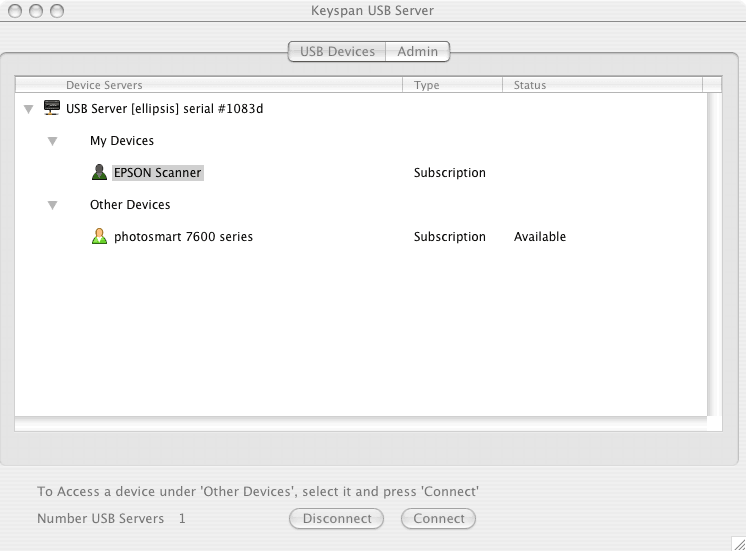
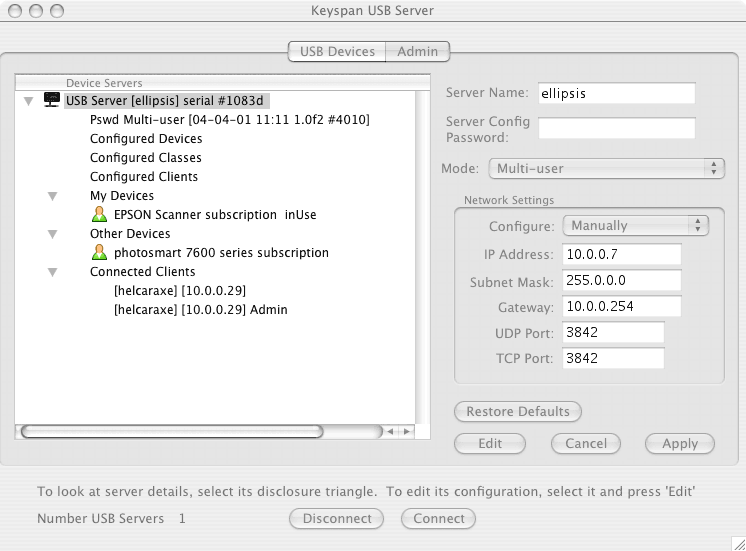
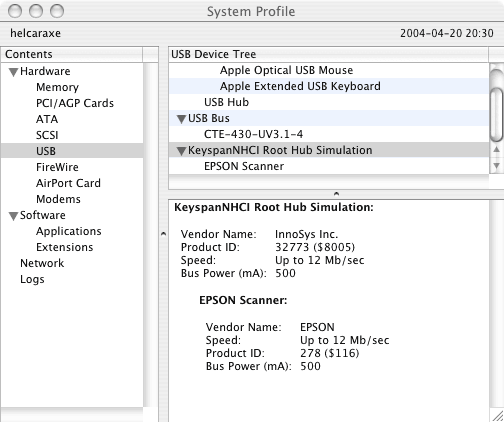
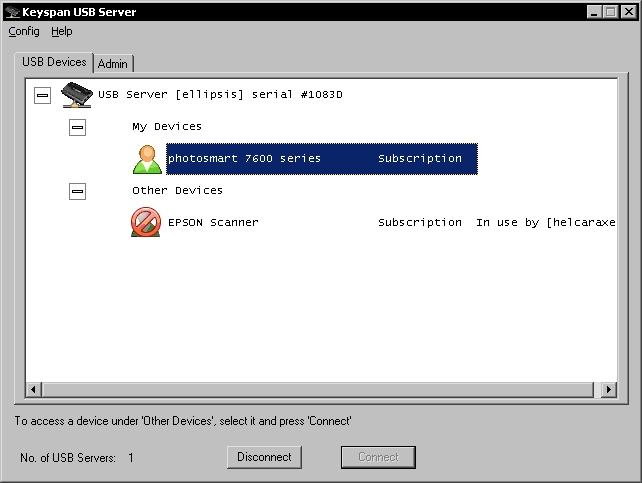
You install the driver software (Windows 2000/XP or Mac OS X, no drivers for Linux so far), and it creates a simulated USB hub device that takes care of bridging the USB requests over Ethernet. There is a management program that allows you to configure the settings on the USB Server such as the IP address (zeroconf, a.k.a RendezVous is supported, a nice touch), password and access mode. The user interface is functional, if not perfectly polished. To use a USB peripheral hooked to the USB server, you fire up the admin client, select one of the USB devices and take a “lease” on it. I have links to some screen shots of the GUI below:

The process is as smooth as it can possibly be, given that USB devices are not designed to be shared between multiple hosts, and thus some form of locking had to be provided. I tried my scanner over the Ethernet, and have not noticed any perceptible degradation in performance. The software copes with sleep mode correctly. The only nit I would have to pick is that the power adapter “wall wart” DC connector slips off the device too easily (not enough friction to hold it in place), disconnecting it.

Many families are becoming multi-computer households. The Keyspan USB Server is a surprisingly effective way to share peripherals or to move bulky and seldom used peripherals out of the way. At a street price of around $100, it is not inexpensive, but I found it a very worthwhile accessory for my home network.

Making Mac OS X sleep from the command line

In a previous article, I showed how to use Wake-on-LAN to remotely wake a sleeping Mac. I often log on to my home Mac remotely using SSH via my Solaris home server, waking it in the process. With the default settings, the machine will go back to sleep after a few minutes of inactivity.

I recently changed my system defaults to never make the machine sleep, however, because OS X’s sleep functionality will cause the system to sleep even when active Unix jobs are running, like long compiles. That is because the OS has no way of distinguishing between live applications and background daemons. There does not seem to be a command-line utility allowing the user to put the machine to sleep, however, so I quickly wrote one, using Apple Q&A 1134 as a starting point.

You can download the command and source code (including a Panther binary) here: macsleep-1.0.tar.gz (Tiger and Intel users, see below for 1.1)

Restrictions: this command will only work if the user ID it is being executed from matches the user ID of the currently logged on user (not a problem for me because I have auto-logon enabled).

Update (2003-12-06):

Mike Harris reports another similar utility already exists, SleepNow.

Update (2005-11-30):

Kalvis Jansons suggests using AppleScript and the System Events application introduced in 10.3 to achieve the same results, using the following shell script:

#!/bin/bash
osascript << EOT
tell application "System Events"
     sleep
end
EOT

Update (2006-04-02):

I have rebuilt the program for Tiger in both Intel and PowerPC flavors, as well as a universal binary. The new version is macsleep-1.1.tar.gz. The source code itself is unchanged.