Mac

Making ScanSnap Receipts usable

For a long time I used a service called Shoeboxed to scan and organize my credit card receipts. Basically stuff your receipts in a US prepaid envelope, drop it in the mail, and they scan, OCR and shred them, as well as analyzing the text to extract the information. Unfortunately, since I moved to the UK the service leaves to be desired, and the price has also gone up over time.

I have a couple of Fujitsu ScanSnap document scanners, a S1500M, which is no longer supported on macOS Mojave (but fortunately is by the third-party app ExactScan), and an iX100 which still is supported, as well as a SV600 which is utterly unsuited to dealing with crumpled receipts. The new, dumbed-down ScanSnap Home app that ships with ScanSnaps has a receipt mode. Since I never use the iX100 to scan documents at home given I have a S1500M (it’s a handheld battery=powered simplex scanner that’s mostly intended for mobile use), I dedicated it and ScanSnap Home to scanning receipts.

The basic functionality of scanning, deskewing, OCR-ing and extracting date, amount, vendor and so on mostly works, but otherwise ScanSnap Receipts is an ergonomic disaster. For starters, it never recognizes the currency correctly and always identifies my transactions as being in dollars rather than pounds. Secondly, it inexplicably lacks the ability to batch-edit receipts, e.g. select the date range for my last trip to France and change all of them from dollars to euros. You need to edit them one by one, which is as incredibly tedious as you can imagine.

After a few weeks of this, I decided to take matters in my own hand. It turns out ScanSnap Home uses Core Data backed by an underlying SQLite database. SQLite is the world’s most widely deployed database (every single Android and iOS smartphone includes it, for starters), but the Core Data object-relational mapper above it does a terrific job of obfuscating it and reducing its performance. Nonetheless, after a little bit of digging, I wrote the following script to automate the most repetitive operations:

  1. Stop all ScanSnap auxiliary processes, as they have the DB opened even if you quit the app
  2. Set the currency for all transactions tagged as Unchecked (ScanSnap Home does this by default) to GBP
  3. Normalize all unchecked Waitrose vendor names to Waitrose
  4. Same for Tesco
  5. Rename M&S to Marks & Spencer
  6. Fixes for Superdrug and Sainsbury’s
  7. Set the amount of receipts tagged as duplicates to zero
  8. Attempt to fix little-endian European format DD/MM/YYYY dates parsed as middle-endian US format MM/DD/YYYY
  9. Attempt to fix Euro format DD/MM/YY dates parsed as US format YY/MM/DD
  10. Restart ScanSnap Home

The timestamps in the database are in a strange format that seems to be the number of seconds since an epoch of 2001-01-01T00:00:00 UTC. I hope no one tries to scan receipts older than that… You can convert to UNIX timestamps by adding 978307200 and from there to SQLite’s Julian Day format.

One major annoyance thing this script attempts to fix is dates. Because date formats are ambiguous (is 11/3/20 March 11 2020, or November 3 2020 or perversely March 20 2011?) and point-of-sale vendors are neither ISO 8601 nor even Y2100 compliant, parsing dates is a minefield. My assumption is that receipts will be scanned in a reasonably timely manner, and if there is ambiguity, the closest date should win.

#!/bin/sh
pkill -9 -f ScanSnap

sqlite3 "$HOME/Library/Application Support/PFU/ScanSnap Home/Managed/ScanSnapHome.sqlite" << EOF

.mode lines

UPDATE zcontent
SET zcurrencysign=(SELECT z_pk FROM zcurrencysign WHERE zvalue='GBP')
WHERE zdoctype=4 AND z_pk IN (
  SELECT z_4contents
  FROM z_4labels
  JOIN zlabel ON z_15labels=zlabel.z_pk
  WHERE zlabel.zname='Unchecked'
);

UPDATE zcontent
SET zvendor=(SELECT z_pk FROM zvendor WHERE zvalue='Waitrose')
WHERE zdoctype=4 AND z_pk IN (
  SELECT z_4contents
  FROM z_4labels
  JOIN zlabel ON z_15labels=zlabel.z_pk
  WHERE zlabel.zname='Unchecked'
) AND zvendor IN (
  SELECT z_pk FROM zvendor
  WHERE zvalue<>'Waitrose' AND zvalue LIKE '%waitrose%'
);

UPDATE zcontent
SET zvendor=(SELECT z_pk FROM zvendor WHERE zvalue='Tesco')
WHERE zdoctype=4 AND z_pk IN (
  SELECT z_4contents
  FROM z_4labels
  JOIN zlabel ON z_15labels=zlabel.z_pk
  WHERE zlabel.zname='Unchecked'
) AND zvendor IN (
  SELECT z_pk FROM zvendor
  WHERE zvalue<>'Tesco' AND zvalue LIKE '%tesco%'
);

UPDATE zcontent
SET zvendor=(SELECT z_pk FROM zvendor WHERE zvalue='Marks & Spencer')
WHERE zdoctype=4 AND z_pk IN (
  SELECT z_4contents
  FROM z_4labels
  JOIN zlabel ON z_15labels=zlabel.z_pk
  WHERE zlabel.zname='Unchecked'
) AND zvendor IN (
  SELECT z_pk FROM zvendor
  WHERE zvalue LIKE '%M&S%'
);

UPDATE zcontent
SET zvendor=(SELECT z_pk FROM zvendor WHERE zvalue='Superdrug')
WHERE zdoctype=4 AND z_pk IN (
  SELECT z_4contents
  FROM z_4labels
  JOIN zlabel ON z_15labels=zlabel.z_pk
  WHERE zlabel.zname='Unchecked'
) AND zvendor IN (
  SELECT z_pk FROM zvendor
  WHERE zvalue<>'Superdrug' AND zvalue LIKE '%superdrug%'
);

UPDATE zcontent
SET zvendor=(SELECT z_pk FROM zvendor WHERE zvalue='Sainsbury''s')
WHERE zdoctype=4 AND z_pk IN (
  SELECT z_4contents
  FROM z_4labels
  JOIN zlabel ON z_15labels=zlabel.z_pk
  WHERE zlabel.zname='Unchecked'
) AND zvendor IN (
  SELECT z_pk FROM zvendor
  WHERE zvalue<>'Sainsbury''s' AND zvalue LIKE '%Sainsbury%'
);

UPDATE zcontent
SET zamount=0.0
WHERE zdoctype=4 AND z_pk IN (
  SELECT z_4contents
  FROM z_4labels
  JOIN zlabel ON z_15labels=zlabel.z_pk
  WHERE zlabel.zname='Duplicate'
);

UPDATE zcontent
SET zreceiptdate = strftime('%s', 
  strftime('%Y-%d-%m', zreceiptdate+978307200, 'unixepoch', 'localtime'),
  'utc'
)-978307200
WHERE zdoctype=4 AND z_pk IN (
  SELECT z_4contents
  FROM z_4labels
  JOIN zlabel ON z_15labels=zlabel.z_pk
  WHERE zlabel.zname='Unchecked'
)
AND zreceiptdate IS NOT NULL
AND strftime('%s', 
  strftime('%Y-%d-%m', zreceiptdate+978307200, 'unixepoch', 'localtime'),
  'utc'
)-978307200
BETWEEN zreceiptdate AND strftime('%s', 'now')-978307200;

UPDATE zcontent
SET zreceiptdate = strftime('%s',
  strftime('20%d-%m-', zreceiptdate+978307200,
           'unixepoch', 'localtime') ||
  substr(strftime('%Y', zreceiptdate+978307200,
         'unixepoch', 'localtime'), 3),
  'utc'
)-978307200
WHERE zdoctype=4 AND z_pk IN (
  SELECT z_4contents
  FROM z_4labels
  JOIN zlabel ON z_15labels=zlabel.z_pk
  WHERE zlabel.zname='Unchecked'
)
AND zreceiptdate IS NOT NULL
AND strftime('%s',
  strftime('20%d-%m-', zreceiptdate+978307200,
           'unixepoch', 'localtime') ||
  substr(strftime('%Y', zreceiptdate+978307200,
         'unixepoch', 'localtime'), 3),
  'utc'
)-978307200
BETWEEN zreceiptdate AND strftime('%s', 'now')-978307200;

EOF

open /Applications/ScanSnapHomeMain.app

Note that the SQLite database is not used only by expenses (ZCONTENT.ZDOCTYPE=4) but also to store a summary of all documents scanned. Also, the ZCONTENT table has a column ZUNCHECKED that is not what you would expect, it is a constant 1 even if you remove the Unchecked tag from the transaction.

Now, all the usual disclaimers apply, modifying the database directly is not something supported by the app developer, and could have unintended consequences. If you use this script (or more likely modify it for your needs), I disclaim responsibility for any damages or data loss this may cause.

Update (2020-10-01):

Added:

  • setting duplicate receipt amounts to 0
  • fixing DD/MM/YYYY dates misparsed as MM/DD/YYYY
  • fixing DD/MM/YY dates misparsed as YY/MM/DD

Scanner group test

TL:DR Avoid scanners with Contact Image Sensors if you care at all about color fidelity.

Vermeer it is not

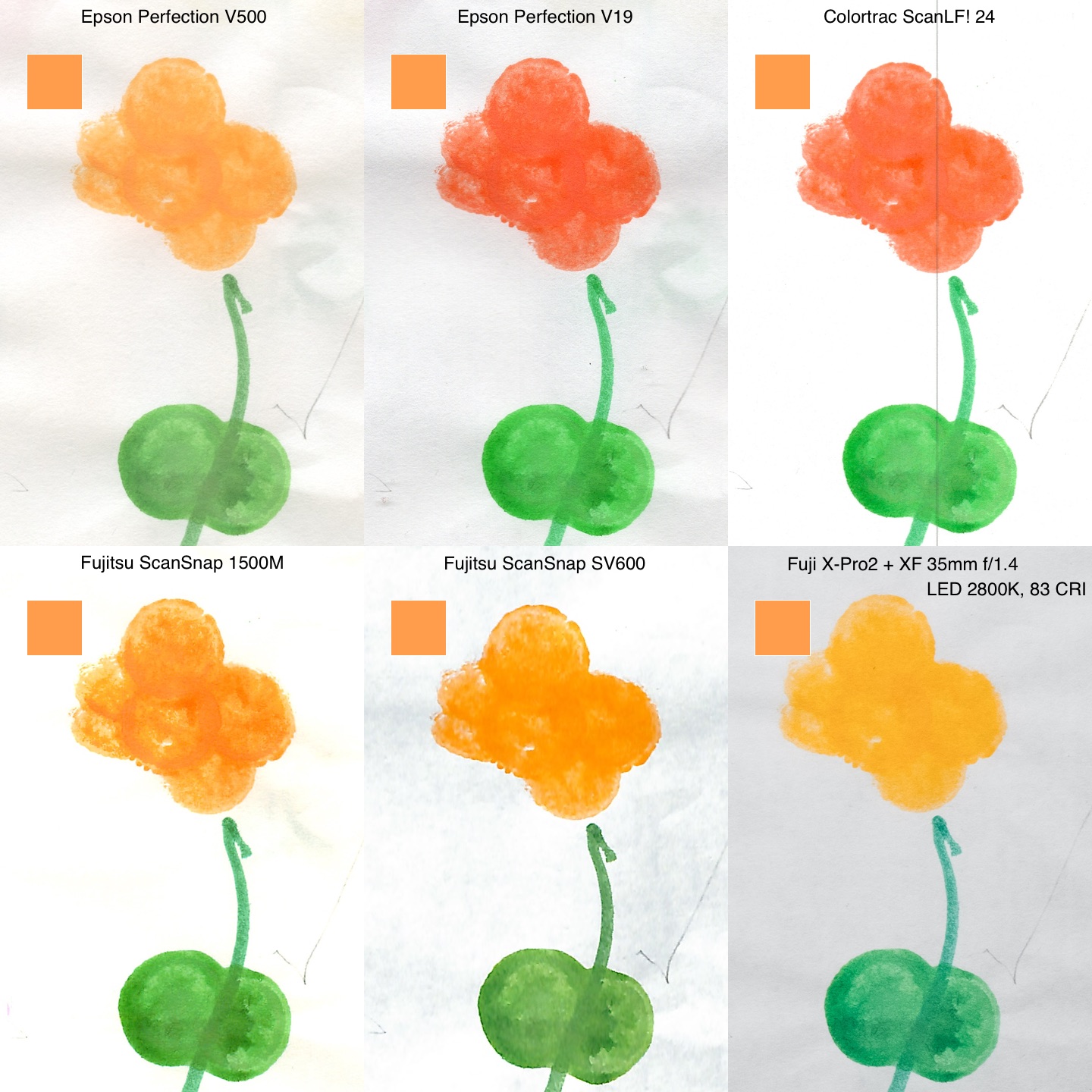
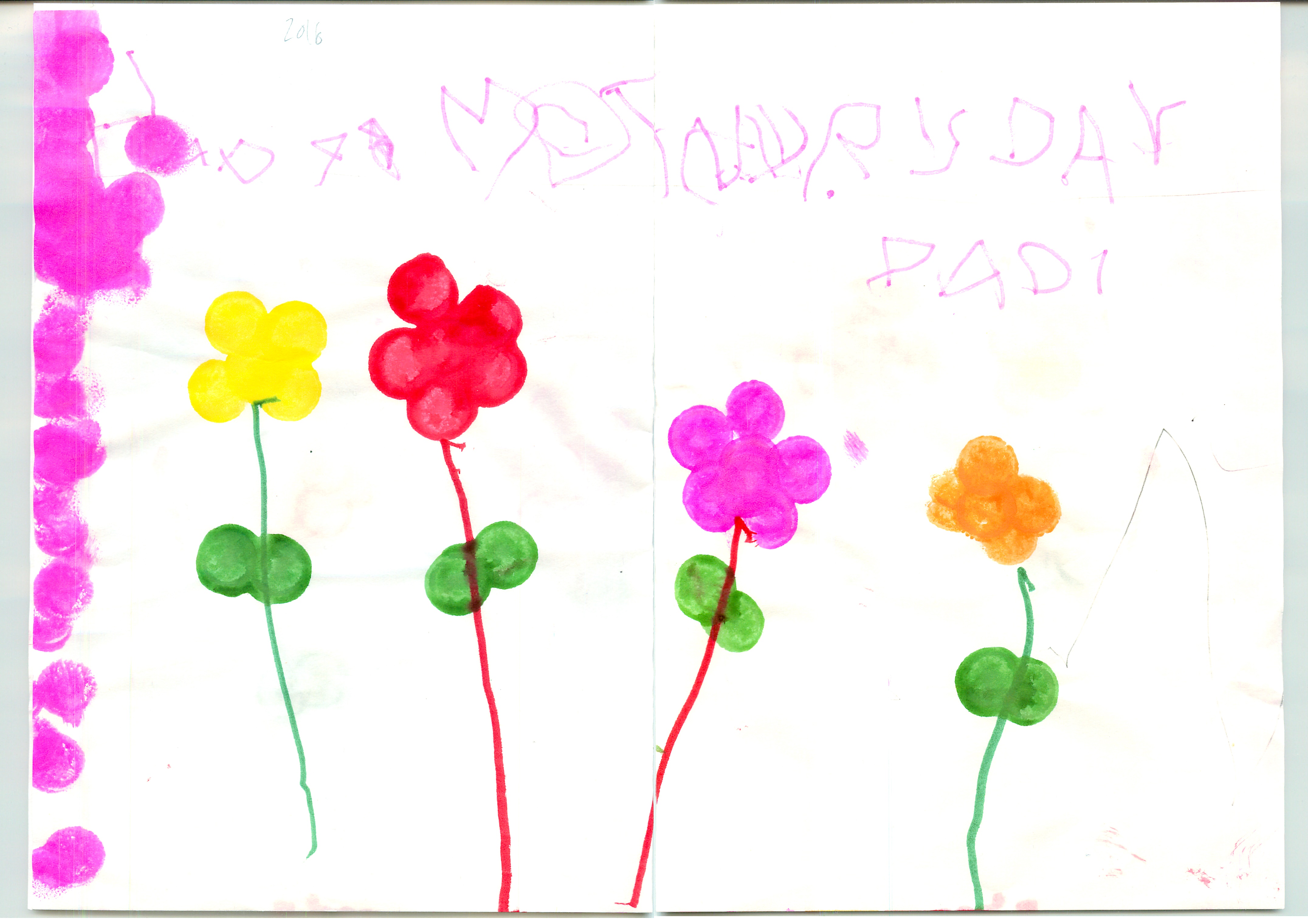
After my abortive trial of the Colortrac SmartLF Scan, I did a comparative test of scanning one of my daughter’s A3-sized drawings on a number of scanners I had handy.

Scanner Sensor Scan
Colortrac SmartLF Scan CIS ScanLF.jpg
Epson Perfection Photo V500 Photo (manually stitched) CCD Epson_V500.jpeg
Epson Perfection V19 (manually stitched) CIS Epson_V19.jpg
Fujitsu ScanSnap S1500M (using a carrier sheet and the built-in stitching) CCD S1500M_carriersheet.jpg
Fujitsu ScanSnap SV600 CCD SV600.jpg
Fuji X-Pro2 with XF 35mm f/1.4 lens, mounted on a Kaiser RS2 XA copy stand with IKEA KVART 3-spot floor lamp (CCT 2800K, a mediocre 82 CRI as measured with my UPRtek CV600) CMOS X-Pro2.jpg

I was shocked by the wide variance in the results, as was my wife. This is most obvious in the orange flower on the right.

Comparison

I scanned a swatch of the orange using a Nix Pro Color Sensor (it’s the orange square in the upper right corner of each scan in the comparison above). When viewed on my freshly calibrated NEC PA302W SpectraView II monitor, the Epson V500 scan is closest, followed by the ScanSnap SV600.

The two scanners using Contact Image Sensor (CIS) technology yielded dismal results. CIS are used in low-end scanners, and they have the benefit of low power usage, which is why the only USB bus-powered scanners available are all CIS models. CIS sensors begat the CMOS sensors used by the vast majority of digital cameras today, superseding CCDs in that application, I would not have expected such a gap in quality.

The digital camera scan was also quite disappointing. I blame the poor quality of the LEDs in the IKEA KVART three-headed lamp I used (pro tip: avoid IKEA LEDs like the plague, they are uniformly horrendous).

I was pleasantly surprised by the excellent performance of the S1500M document scanner. It is meant to be used for scanning sheaves of documents, not artwork, but Fujitsu did not skimp and used a CCD sensor element, and it shows.

Pro tip: a piece of anti-reflective Museum Glass or equivalent can help with curled originals on the ScanSnap SV600. I got mine from scraps at a framing shop. I can’t see a trace of reflections on the scan, unlike on the copy stand.

Update (2018-10-14):

Even more of a pro tip: a Japanese company named Bird Electron makes a series of accessories for the ScanSnap line, including a dust cover for the SV600 and the hilariously Engrish-named PZ-BP600 Book Repressor, essentially a sheet of 3mm anti-reflection coated acrylic with convenient carry handles. They are readily available on eBay from Japanese sellers.

Avery 22807 template for InDesign

The Avery 22807 2-inch circular stickers are a good alternative to Moo, PSPrint et al when you need a small quantity of stickers in a hurry. Unfortunately Avery has not seen it fit to provide usable InDesign templates as they do with some of their other sticker SKUs, only Microsoft Word, which is needless to say inadequate. A search for “Avery 22807 Indesign template” yielded some, but they have issues with missing linked PDF files.

I reverse-engineered the Microsoft template to build one of my own, with dimensions (including the tricky almost-but-not-quite square grid spaced at 5/8″ horizontally but 7/12″ vertically) to simplify “Step and Repeat…”.

I have only tested this with my InDesign CS6, not sure if it will work with older versions.

Avery 22807 2-inch circular labels.indt

On the bugginess of El Capitan

I never updated my home Mac Pro to El Capitan. To paraphrase Borges, each successive Apple OS release since Snow Leopard makes you long for the previous one. Unfortunately I have no choice but to run the latest OS X release on my work Macs as that is usually required to run the latest Xcode, itself required for the App Store.

I did not realize how bad El Capitan was until I upgraded my work iMac (27-inch 5K model) to Sierra last week. Previously, I would experience a mean time between crashes of around 3 days. I thought it was flaky hardware (the problems started from when I unboxed the computer), but couldn’t find the time to take it to the Genius Bar. I had also experienced the same problem with my old home 2009 Nehalem Mac Pro, which I had taken to the office, in fact that’s why I bought the iMac in the first place (and the first one I ordered had to go back because of defective pins in the RAM expansion slots). The Mac Pro had previously been rock-steady at home.

Since I upgraded to Sierra, I haven’t had a single crash. The only possible conclusion is that El Capitan bugs were to blame. The only thing unusual about this iMac is I upgraded the RAM from OWC, but the memory passes testing using Micromat’s TechTool.

I am not one to look at the Steve Jobs era with rosy-tinted glasses, OS X has never had the same level of stability as Solaris or even Linux, but Apple’s hardware and software quality has really gone to the dogs of late, something Lloyd Chambers dubs Apple Core Rot.

I am now starting to hedge my bets and am testing Ubuntu for my laptop computing needs, first by repurposing my 2008-vintage first-generation MacBook Air that is no longer supported by OS X anyway (works, but painfully slow) and soon with a shiny new HP Spectre on order.

Avoiding counterfeit goods on Amazon: mission impossible?

I mentioned previously that I seldom shop for electronics on Amazon.com any more, preferring B&H Photo whenever possible. I now have another reason: avoiding counterfeit goods.

My company boardroom is in an electromagnetic war zone—dozens of competing WiFi access points combined with electronic interference from the US-101 highway just outside make WiFi reception tenuous at best, and unusable more often than not. To work around this, we set up a wired Ethernet switch, and since most of our staff use MacBook Airs, Apple USB Ethernet adapters purchased from Amazon. When I side-graded from my 15″ Retina MacBook Pro to a much more portable 12″ Retina MacBook, I wasn’t able to connect using the dongle, and the name of the device was interspersed with Chinese characters. At first I thought it was an issue with my Satechi USB-C hub, but I experienced the same problems via a genuine Apple USB-C multiport adapter as well.

Eventually I figured out the Ethernet dongles were counterfeit. The packaging, while very similar to Apple’s, was just a tiny bit off, like amateurish margins between the Apple logo and the edges of the card. On the dongles themselves, the side regulatory disclosures sticker was inset, not flush with the body of the adapter.

Counterfeiting is a major problem. By some accounts, one third of all Sandisk memory cards worldwide are counterfeits. In some cases like chargers or batteries, your equipment could be at risk, or even your very life. The counterfeit adapters we purchased from Amazon did not come from Amazon themselves but from a third-party merchant participating in the Amazon marketplace. To Amazon’s credit, we returned them for a prompt, no questions asked refund even though we bought them over six months ago, but it is hard to believe Amazon is unaware of the problem rather than willfully turning a blind eye to it.

My first reaction was to tell our Office Manager to make sure to buy only from Amazon rather than third-party merchants (pro tip: including “amazon” in your Amazon search terms will do that in most cases). Unfortunately, that may not be enough. Amazon has a “fulfilled by Amazon” program for merchants where you ship your goods to them, and they handle warehousing and fulfillment. These “fulfilled by Amazon” items are also more attractive to Prime members. One option Amazon offers is Stickerless, commingled inventory where the items you send are put into a common bin. Amazon still has the ability to trace the provenance of the item through its inventory management, but for purposes of order fulfillment they will be handled just like Amazon’s own stock. Some categories like groceries and beauty products are excluded, but electronics are not.

The implications are huge: even if the vendor is Amazon itself, you cannot be sure that the item is not counterfeit. All the more reason to buy only from trustworthy, single-vendor sites like B&H, even if shipping is a bit slower.