Mac

Incensed at Mozilla

One of the greatest features in the Webkit-based browsers (Apple’s Safari and Google Chrome) is WebSQLdatabase, the ability for a web site to store information in a SQLite database on your browser accessible via JavaScript. This allows web developers to build database-enabled applications that run entirely in the browser, without requiring a server. This is very useful for mobile devices, which in the US enjoy flaky network connectivity at best. One very handsome example is the iPad-optimized Every Time Zone webapp.

SQLite is probably the most important open-source project you have never heard of. It is a simple, streamlined and efficient embedded database. Firefox stores its bookmarks in it. Google distributes its database of phishing sites in that format. Sun’s industrial-strength Solaris operating system stores the list of services it runs on boot in it—if it were to fail, a server would be crippled so that is a pretty strong vote of confidence. Adobe Lightroom and Apple’s Aperture use it to store their database, as do most Mac applications that use the CoreData framework, and many iPhone apps. In other words, it is robust and proven mission-critical software that is widely yet invisibly deployed.

WebSQLdatabase basically makes the power of SQLite available to web developers trying to build apps that work offline, specially on mobile devices. No good deed goes unpunished, and the Mozilla foundation teamed up with unlikely bedfellow Microsoft to torpedo formal adoption of WebSQLdatabase as a web standard, on spurious grounds, and pushed an alternate standard called IndexedDB instead. To quote the Chromium team:

Q: Why this over WebSQLDatabase?

A: Microsoft and Mozilla have made it very clear they will not implement SQL in the browser.  If you want to argue this is silly, talk to them, not me.

IndexedDB is several steps backwards. Instead of using powerful, expressive and mature SQL technology, it uses a verbose JavaScript B-tree API that is a throwback to the 1960s bad old days of hierarchical databases and ISAM, requires a lot more work from the developer, for no good reason. To add injury to insult, Firefox 4’s implementation of IndexedDB is actually built on top of SQLite. The end result will be that web developers will need to build a SQL emulation library on top of IndexedDB to restore the SQLite functionality deliberately crippled by IndexedDB. If there is one constant in software engineering, it is that multiple layers add brittleness and impair performance.

Of course, both Mozilla and Microsoft are irrelevant on mobiles, where WebKit has essentially won the day, so why should this matter? Microsoft has always been a hindrance to the development of the web, since they have to protect the Windows API from competition by increasingly capable webapps, but I cannot understand Mozilla’s attitude, except possibly knee-jerk not-invented-here syndrome and petulance at being upstaged by WebKit. WebSQLdatabase is not perfect—to reach its full potential, it needs and automatic replication and sync facility between the local database and the website’s own database, but it is light years ahead of IndexedDB in terms of power and productivity.

I am so irritated by Mozilla’s attitude that after 10 years of using Mozilla-based browsers, I switched today from Firefox to Chrome as my primary browser. Migrating was surprisingly easy. Key functionality like bookmark keywords, AdBlock, FlashBlock, a developer console, and the ability to whitelist domains for cookies, all have equivalents on Chrome. The main regressions are bookmark tags, and Chrome’s sync options are not yet equivalent to Weave‘s. At some point I will need to roll my own password syncing facility (Chrome stores its passwords in the OS X keychain, which is also used by Safari and Camino).
Ginormous iPod to go

The hard drive in my October 2006 vintage 80GB iPod 5.5G died a few weeks ago.  I wasn’t keen on upgrading to the iPod Classic as:

  1. With a maximum capacity of 160GB, it is still too small to house my entire 220GB music collection
  2. Apple introduced encrypted audio outputs on the dock connector, to force accessory makers to pay royalties, thus making it incompatible with many accessories and forcing you to buy new ones.

I use my iPod mostly in my car. The classic hard drive iPods have one key capability iPhones and iPod Touches lack—the ability to shuffle by album, which is essential when you listen mostly to classical music and where an opus maps to an album.

While investigating repair options, I found out Toshiba now makes a two-platter 240GB (224 GiB) hard drive. The iPod Classic won’t recognize the second platter (a third strike against it) but the 5.5G will. I sent mine to RapidRepair for repair/upgrade and received it back yesterday. The flip side of such an enormous drive is that the sync takes forever: I started it around 10PM yesterday and it is till running, over 9 hours later. They handled the repair very professionally, there are no marks on the casing, and I now have a fully functional 224GB iPod for less than the price of buying a new 160GB iPod Classic. The only feature it is missing is the ability to play 24-bit/96kHz ALAC files like those I made out FLACs purchased from Linn or the B&W Society of Sound.

I can’t understand why Apple does not make this new high-capacity drive available in iPods or the MacBook Air.

One month with the iPad

Since I got my iPad six weeks ago, I have only used my MacBook Air once.

I am not going to repeat the extensive reviews posted elsewhere, but after over a month of extensive use, give some perspective for those who don’t get the point of the iPad, or other similar devices.

First of all, commentators have focused on entirely the wrong thing: feeds and speeds, missing features like multitasking or Flash, Apple’s iron fist over app developers. The iPad begins and ends with the user experience, and that means multi-touch and the incredibly long battery life. That’s why comparisons to stylus-driven devices like the unsuccessful Microsoft Tablet PC miss the point. The amazing battery life, specially on standby (I have never managed to go under 60%, even after three days without charging), means you can use it as a real mobile device and not subconsciously watch the battery meter.

Is it a perfect device? Of course not. Mobile Safari has a hard time with complex and heavy pages like those from my Temboz RSS/Atom feed reader, the screen is too prone to reflections and fingerprints, and Apple’s use of high-quality materials like aluminium and glass instead of plastic and acrylic makes it heavier to hold than necessary.

As to whether it is a replacement for a laptop, the answer is yes and no. The iPad is the first in an entirely new class of devices, and I think it has the potential to replace desktop and laptop computers as the dominant form of consumer computing. The touch user interface makes for a very engaging user experience, far more than using a mouse and keyboard ever did. To be sure, the input limitations do not make it a very efficient content creation device, but that’s where opinions diverge.

I use desktop computers for real work (an eight-core Mac Pro with 12G of RAM and a 30″ display at home, a quad-core iMac with a 27″ display at work). A laptop just feels too constricting for extended use. I have the luxury of using proper desktops because I do not travel much for work, and the extent of my mobile use is reading books or browsing the web while commuting by bus. The improvements that most benefit me are in synchronizing my iPad with multiple computers, and offline capability (I got the WiFi model since there is no way I will pay AT&T for their garbage excuse of a network).

Road warriors need a more featured device, even if cramped, and will not be so impressed. I think genuine mobile users are a minority, however. Surveys in the past showed that most laptops are tethered, i.e. users would unplug them from home, take them to work and plug them there, and back. That is why Windows laptop makers introduced monstrosities like Pentium 4 powered laptops with battery lives that barely exceeded the hour. Laptop sales exceeded those of desktops because many people wanted the option of mobility, even if they seldom, if ever, availed themselves of it, and a less obtrusive presence in their homes than the typical beige box with its rat’s warren of cables. Those people would be better served by a well-designed desktop like the iMac and an iPad for the occasional mobile use.

Strange X11 behavior in Snow Leopard 10.6.3

After updating OS X on my work iMac, I noticed XEmacs and DDD take about 30 seconds to launch, behavior I did not see before the upgrade, and do not see at home either. The 30 seconds are suspiciously similar to a name lookup timeout—I am dependent on whatever lame excuse for a DNS caching server is used in my landlord’s 2WIRE router, whereas I run unbound at home.

Sure enough, running a packet trace shows strange DNS lookups:

tellann:src root# tcpdump udp port 53
tcpdump: verbose output suppressed, use -v or -vv for full protocol decode
listening on en0, link-type EN10MB (Ethernet), capture size 65535 bytes
13:18:51.819226 IP tellann.58811 > home.domain: 5470+ A? tellann.gateway.2wire.net. (43)
13:18:51.840258 IP home.domain > tellann.58811: 5470* 1/1/1 A 192.168.1.81 (150)
13:18:51.841196 IP tellann.58057 > home.domain: 18746+ A? /tmp/launch-4UITkL/org.x.gateway.2wire.net. (60)
13:18:51.870233 IP home.domain > tellann.58057: 18746 Refused*- 0/0/0 (512)
13:18:52.842654 IP tellann.58057 > home.domain: 18746+ A? /tmp/launch-4UITkL/org.x.gateway.2wire.net. (60)
13:18:52.865696 IP home.domain > tellann.58057: 18746 Refused*- 0/0/0 (512)

The code>DISPLAY environment variable has changed to:

tellann ~>echo $DISPLAY
/tmp/launch-4UITkL/org.x:0

Before 10.6.3, it did not have the org.x bit. This whole approach of using a DISPLAY set to point to a UNIX domain socket was set up by Apple to allow launching X11.app on demand when a X client is run, but obviously many clients make the incorrect assumption that the part before the :0 display number is a hostname if it has a dot in it, and this is biting us.

The solution is simple: just set DISPLAY to :0 prior to launching XEmacs or DDD, and presto—no more delays, e.g:

env DISPLAY=:0 xemacs&

Matias Tactilepro 3.0 review

The decline in computer prices in the last 10 years is not an unqualified blessing. Something had to give, and component quality is one of the areas where manufacturers skimp. There is no room in a $500 computer for a $100 CD-ROM drive, even a quiet yet ultra-fast one like the Kenwood 72X drives.

Another area where components have been cheapened is keyboards and mice. The impact on mice is lessened by the simultaneous transition from gunk-prone mechanical ball mice to more precise optical ones. The latter are cheaper to manufacture because they use solid state circuitry and far fewer mechanical components, but they are still pitched as a premium product.

Keyboards are another story. Anyone who writes or codes for a living (i.e. anyone who uses a computer for anything but games) benefits from a good keyboard. Longtime Byte Magazine columnist Jerry Pournelle used to rave about his Northgate OmniKey with a layout customized specifically for him. There are basically two main technologies: mechanical keyswitches and rubber dome ones. The first give that old-fashioned “clickety-clack” feeling, the second are quieter, but often a bit mushy (although there are some excellent rubber dome keyboards as well).

A few years ago, I bought the excellent Matias Tactilepro 1 keyboard. It uses premium Alps mechanical keyswitches, and has all the Macintosh special characters combinations silk-screened on the keys so you don’t have to remember that the copyright sign © is Option-g. I liked it so much that just to be on the safe side, I bought two.

At Macworld 2007, Matias announced its replacement by the Tactilepro 2, which replaces the Alps keyswitches by ones of Matias’ own design. They claimed the change was due to Alps discontinuing the manufacture of its keyswitches. By Macworld 2008, the 2.0 was itself discontinued, and the promised version 3 replacement kept being postponed until they finally announced a release date of January 2010. Interestingly, they are said to use Alps keyswitches. I guess they were not so discontinued after all…

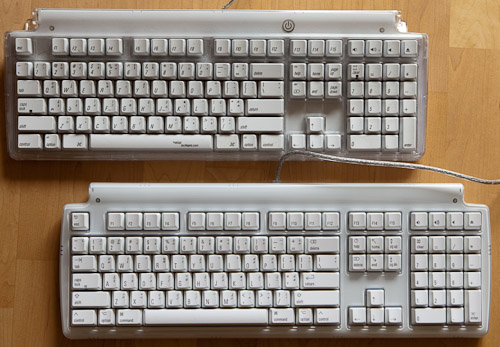
While my version 1 Tactilepros are still working fine, the silk-screening on some of the keys has faded, and they have accumulated a fair bit of gunk like hairs under the keys. I ordered two version 3 replacements (I passed on the version 2, and read many reports complaining about it) and received them today.

Matias Tactilepro 1 (top) and 3 (bottom)

Matias Tactilepro 1 (top) and 3 (bottom)

The differences are subtle:

  • The top of the keyboard is now a translucent milky white instead of transparent. That should help reduce the visibility of hairs and other crud that lodges itself under the keys, and is very hard to eradicate afterwards, even with canned air.
  • The power key on top is gone, replaced by a dual-use Escape and power key.
  • The warranty was dialed all the way down from 5 years to 1 year, hardly consistent with the claims of improved build quality.
  • They now claim the keys are laser-etched and thus more resistant to rubbing out the labels. Obviously it is too early to assess the accuracy of that statement.
  • The feel of the keys is slightly different in a way that’s hard to describe. They seem a little bit quieter, but just as precise.
  • The 2-port built-in USB 1.0 hub was replaced by a 3-port USB 2.0 hub
  • There is no tacky tactilepro.com URL on the space bar any more.
  • The typeface is no longer italic and somewhat less elegant. I am a fast hunt-and-peck typist, not a touch-typist, and they feel canted backwards, much like early flat-screen monitors seemed concave compared to convex CRTs.

The warranty change is a bummer, but the keyboard is still a huge improvement over standard ones, specially Apple’s nasty laptop-style chiclet keyboards that have been included with all recent desktop models. For people who have to type a lot, it is well worth the expense.

Update (2012-03-05):

Sure enough, the space bar on mine failed after 14 months. I contacted Matias last week for support, with no response so far.

One alternative worth considering is the upcoming Das Keyboard for Mac, which uses Cherry gold keyswitches. It doesn’t have option characters engraved on the key caps, however.

Update (2017-10-05):

I replaced my Tactilepros with the CODE Keyboard. It’s not perfect either, the black coating on the keys wore off on some keys like the corner of the space bar on the one I keep at work, but the backlit keys are a god-send and my colleagues find the quieter yet still very tactile key action much less objectionable.

Interestingly, Cherry, the maker of the key switches in the CODE and many other premium keyboards, is a sister company of ZF, the makers of the automatic transmissions in BMWs.