Photo

Is the Nikon D70 NEF (RAW) format truly lossless?

Many digital photographers (including myself) prefer shooting in so-called RAW mode. In theory, the camera saves the data exactly as it is read off the sensor, in a proprietary format that can later be processed on a PC or Mac to extract every last drop of performance, dynamic range and detail from the captured image, something the embedded processor on board the camera is hard-pressed to do when it is trying to cook the raw data into a JPEG file in real time.

The debate rages between proponents of JPEG and RAW workflows. What it really reflects is two different approaches to photography, both equally valid.

For people who favor JPEG, the creative moment is when you press the shutter release, and they would rather be out shooting more images than slaving in a darkroom or in front of a computer doing post-processing. This was Henri Cartier-Bresson’s philosophy — he was notoriously ignorant of the details of photographic printing, preferring to rely on a trusted master printmaker. This group also includes professionals like wedding photographers or photojournalists for whom the productivity of a streamlined workflow is an economic necessity (even though the overhead of a RAW workflow diminishes with the right software, it is still there).

Advocates of RAW tend to be perfectionists, almost to the point of becoming image control freaks. In the age of film, they would spend long hours in the darkroom getting their prints just right. This is the approach of Ansel Adams, who used every trick in the book (he invented quite a few of them, like the Zone System) to obtain the creative results he wanted. In his later days, he reprinted many of his most famous photographs in ways that made them darker and filled with foreboding. For RAW aficionados, the RAW file is the negative, and the finished output file, which could well be a JPEG file, the equivalent of a print.

Implicit is the assumption that the RAW files are pristine and have not been tampered with, unlike JPEGs that had post-processing such as white balance or Bayer interpolation applied to them, and certainly no lossy compression. This is why the debate can get emotional when a controversy erupts, such as whether a specific camera’s RAW format is lossless or not.

The new Nikon D70’s predecessor, the D100, had the option of using uncompressed or compressed NEFs. Uncompressed NEFs were about 10MB in size, compressed NEF between 4.5MB and 6MB. In comparison, the Canon 10D lossless CRW format images are around 6MB to 6.5MB in size. In practice, compressed NEFs were not an option as they were simply too slow (the camera would lock up for 20 seconds or so while compressing).

The D70 only offers compressed NEFs as an option, but mercifully they have improved the performance. Ken Rockwell asserts D70 compressed NEFs are lossless, while Thom Hogan claims:

Leaving off Uncompressed NEF is potentially significant–we’ve been limited in our ability to post process highlight detail, since some of it is destroyed in compression.

To find out which one is correct, I read the C language source code for Dave Coffin’s excellent reverse-engineered, open-source RAW converter, dcraw, which supports the D70. The camera has a 12-bit analog to digital converter (ADC) that digitizes the analog signal coming out of the Sony ICX413AQ CCD sensor. In theory a 12-bit sensor should yield up to 212 = 4096 possible values, but the RAW conversion reduces these 4096 values into 683 by applying a quantization curve. These 683 values are then encoded using a variable number of bits (1 to 10) with a tree structure similar to the lossless Huffmann or Lempel-Ziv compression schemes used by programs like ZIP.

The decoding curve is embedded in the NEF file (and could thus be changed by a firmware upgrade without having to change NEF converters), I used a D70 NEF file made available by Uwe Steinmuller of Digital Outback Photo.

The quantization discards information by converting 12 bits’ worth of data into into log2(683) = 9.4 bits’ worth of resolution. The dynamic range is unchanged. This is a fairly common technique – digital telephony encodes 12 bits’ worth of dynamic range in 8 bits using the so-called A-law and mu-law codecs. I modified the program to output the data for the decoding curve (Excel-compatible CSV format), and plotted the curve (PDF) using linear and log-log scales, along with a quadratic regression fit (courtesy of R). The curve resembles a gamma correction curve, linear for values up to 215, then quadratic.

In conclusion, Thom is right – there is some loss of data, mostly in the form of lowered resolution in the highlights.

Does it really matter? You could argue it does not, as most color spaces have gamma correction anyway, but highlights are precisely where digital sensors are weakest, and losing resolution there means less headroom for dynamic range compression in high-contrast scenes. Thom’s argument is that RAW mode may not be able to salvage clipped highlights, but truly lossless RAW could allow recovering detail from marginal highlights. I am not sure how practicable this would be as increasing contrast in the highlights will almost certainly yield noise and posterization. But then again, there are also emotional aspects to the lossless vs. lossy debate…

In any case, simply waving the problem away as “curve shaping” as Rockwell does is not a satisfactory answer. His argument that the cNEF compression gain is not all that high, just as with lossless ZIP compression, is risibly fallacious, and his patronizing tone out of place. Lossless compression entails modest compression ratios, but the converse is definitely not true: if I replace the file with a file that is half the size but all zeroes, I have a 2:1 compression ratio, but 100% data loss. Canon does manage to get the close to the same compression level using lossless compression, but Nikon’s compressed NEF format has the worst of both world – loss of data, without the high compression ratios of JPEG.

Update (2004-05-12):

Franck Bugnet mentioned this technical article by noted astrophotographer Christian Buil. In addition to the quantization I found, it seems that the D70 runs some kind of low-pass filter or median algorithm on the raw sensor data, at least for long exposures, and this is also done for the (not so) RAW format. Apparently, this was done to hide the higher dark current noise and hot pixels in the Nikon’s Sony-sourced CCD sensor compared to the Canon CMOS sensors on the 10D and Digital Rebel/300D, a questionable practice if true. It is not clear if this also applies to normal exposures. The article shows a work-around, but it is too cumbersome for normal usage.

Update (2005-02-15):

Some readers asked whether the loss of data reflected a flaw in dcraw rather than actual loss of data in the NEF itself. I had anticipated that question but never gotten around to publishing the conclusions of my research. Somebody has to vindicate the excellence of Dave Coffin’s software, so here goes.

Dcraw reads raw bits sequentially. All bits read are processed, there is no wastage there. It is conceivable, if highly unlikely, that Nikon would keep the low-order bits elsewhere in the file. If that were the case, however, those bits would still take up space somewhere in the file, even with lossless compression.

In the NEF file I used as a test case, dcraw starts processing the raw data sequentially beginning at an offset of 963,776 bytes from the beginning of the file, and reads in 5.15MB of RAW data, i.e. all the way to the end of the 6.07MB NEF file. The 941K before the offset correspond to the EXIF headers and other metadata, the processing curve parameters and the embedded JPEG (which is usually around 700K in size on a D70). There is no room left elsewhere in the file for the missing 2.5 bits by 6 million pixels (roughly 2MB) of missing low-order sensor data. Even if they were compressed using a LZW or equivalent algorithm the way the raw data is, and assuming a typical 50% compression ratio for nontrivial image data, that would still mean something like 1MB of data that is unaccounted for.

Nikon simply could not have tucked the missing data away anywhere else in the file. The only possible conclusion is that dcraw does indeed extract whatever image data is available in the file.

Update (2005-04-17):

In another disturbing development in Nikon’s RAW formats saga, it seems they are encrypting white balance information in the D2X and D50 NEF format. This is clearly designed to shut out third-party decoders like Adobe Camera RAW or Phase One Capture One, and a decision that is completely unjustifiable on either technical or quality grounds. Needless to say, these shenanigans on Nikon’s part do not inspire respect.

Generally speaking, Nikon’s software is usually somewhat crude and inefficient (just for the record, Canon’s is far worse). For starters, it does not leverage multi-threading or the AltiVec/SSE3 optimizations in modern CPUs. Nikon Scan displays scanned previews at a glacial pace on my dual 2GHz PowerMac G5, and on a modern multi-tasking operating system, there is no reason for the scanning hardware to pause interminably while the previous frame’s data is written to disk.

While Adobe’s promotion of the DNG format is partly self-serving, they do know a thing or two about image processing algorithms. Nikon’s software development kit (SDK) precludes them from implementing those algorithms instead of Nikon’s, and thus disallows Adobe Camera RAW’s advanced features like chromatic aberration or vignetting correction. Attempting to lock out alternative image-processing algorithms is more an admission of (justified) insecurity than anything else.

Another important consideration is the long-term accessibility of the RAW image data. Nikon will not support the D70 for ever — Canon has already discontinued support in its SDK for the RAW files produced by the 2001 vintage D30. I have thousands of photos taken with a D30, and the existence of third-party maintained decoders like Adobe Camera RAW, or yet better open-source ones like Dave Coffin’s is vital for the long-term viability of those images.

Update (2005-06-23):

The quantization applied to NEF files could conceivably be an artifact of the ADC. Paradoxically, most ADCs digitize a signal by using their opposite circuit, a digital to analog converter (DAC). DACs are much easier to build, so many ADCs combine a precision voltage comparator, a DAC and a counter. The counter increases steadily until the corresponding analog voltage matches the signal to digitize.

The quantization curve on the D70 NEF is simple enough that it could be implemented in hardware, by incrementing by 1 until 215, and then incrementing by the value of a counter afterwards. The resulting non-linear voltage ramp would iterate over at most 683 levels instead of a full 4096 before matching the input signal. The factor of nearly 8 speed-up means faster data capture times, and the D70 was clearly designed for speed. If the D70’s ADC (quite possibly one custom-designed for Nikon) is not linear, the quantization of the signal levels would not in itself be lossy as that is indeed the exact data returned by the sensor + ADC combination, but the effect observed by Christian Buil would still mean the D70 NEF format is lossy.
The megapixel myth – a pixel too far?

Revised introduction

This article remains popular thanks to Google and the like, but it was written 7 years ago and the models described are ancient history. The general principles remain, you are often better off with a camera that has fewer but better quality pixels, though the sweet spot shifts with each successive generation. The more reputable camera makers have started to step back from the counterproductive megapixel race, and the buying public is starting to wise up, but this article remains largely valid.

My current recommendations are:

  • Dispense with entry-level point and shoot cameras. They are barely better than your cameraphone
  • If you must have a pocketable camera with a zoom lens, get the Canon S95, Panasonic LX5, Samsung TL500 or Olympus XZ-1. Be prepared to pay about $400 for the privilege.
  • Upping the budget to about $650 and accepting non-zoom lenses gives you significantly better optical and image quality, in cameras that are still pocketable like the Panasonic GF2, Olympus E-PL2, Samsung NX100, Ricoh GXR and Sony NEX-5.
  • The Sigma DP1x and DP2x offer stunning optics and image quality in a compact package, but are excruciatingly slow to autofocus. If you can deal with that, they are very rewarding.
  • The fixed-lens Fuji X100 (pretty much impossible to get for love or money these days, no thanks to the Sendai earthquake) and Leica X1 offer superlative optics, image and build quality in a still pocketable format. The X1 is my everyday-carry camera, and I have a X100 on order.
  • If size and weight is not an issue, DSLRs are the way to go in terms of flexibility and image quality, and are available for every budget. Models I recommend by increasing price range are the Pentax K-x, Canon Rebel T3i, Nikon D7000, Canon 5DmkII, Nikon D700 and Nikon D3S.
  • A special mention for the Leica M9. It is priced out of most people’s reach, and has poor low-light performance, but delivers outstanding results thanks to Leica lenses and its sensor devoid of anti-alias filters.

Introduction

As my family’s resident photo geek, I often get asked what camera to buy, specially now that most people are upgrading to digital. Almost invariably, the first question is “how many megapixels should I get?”. Unfortunately, it is not as simple as that, megapixels have become the photo industry’s equivalent of the personal computer industry’s megahertz myth, and in some cases this leads to counterproductive design decisions.

A digital photo is the output of a complex chain involving the lens, various filters and microlenses in front of the sensor, and the electronics and software that post-process the signals from the sensor to produce the image. The image quality is only as good as the weakest link in the chain. High quality lenses are expensive to manufacture, for instance, and often manufacturers skimp on them.

The problem with megapixels as a measure of camera performance is that not all pixels are born equal. No amount of pixels will compensate for a fuzzy lens, but even with a perfect lens, there are two factors that make the difference: noise and interpolation.

Noise

All electronic sensors introduce some measure of electronic noise, among others due to the random thermal motion of electrons. This shows itself as little colored flecks that give a grainy appearance to images (although the effect is quite different from film grain). The less noise, the better, obviously, and there are only so many ways to improve the signal to noise ratio:

  • Reduce noise by improving the process technology. Improvements in this area occur slowly, typically each process generation takes 12 to 18 months to appear.
  • Increase the signal by increasing the amount of light that strikes each sensor photosite. This can be done by using faster lenses or larger sensors with larger photosites. Or by only shooting photos in broad daylight where there are plenty of photons to go around.

Fast lenses are expensive to manufacture, specially fast zoom lenses (a Canon or Nikon 28-70mm f/2.8 zoom lens costs over $1000). Large sensors are more expensive to manufacture than small ones because you can fit fewer on a wafer of silicon, and as the likelihood of one being ruined by an errant grain of dust is higher, large sensors have lower yields. A sensor twice the die area might cost four times as much. A “full-frame” 36mm x 24mm sensor (the same size as 35mm film) stresses the limits of current technology (it has nearly 8 times the die size of the latest-generation “Prescott” Intel Pentium IV), which is why the full-frame Canon EOS 1Ds costs $8,000, and professional medium-format digital backs can easily reach $25,000 and higher.

This page illustrates the difference in size of the sensors on various consumer digital cameras compared to those on some high-end digital SLRs. Most compact digital cameras have tiny 1/1.8″ or 2/3″ sensors at best (these numbers are a legacy of TV camera tube ratings and do not have a relationship with sensor dimensions, see DPReview’s glossary entry on sensor sizes for an explanation).

For any given generation of cameras, the conclusion is clear – bigger pixels are better, they yield sharper, smoother images with more latitude for creative manipulation of depth of field. This is not true across generations, however, Canon’s EOS-10D has twice as many pixels as the two generations older EOS-D30 for a sensor of the same size, but it still manages to have lower noise thanks to improvements in Canon’s CMOS process.

The problem is, as most consumers fixate on megapixels, many camera manufacturers are deliberately cramming too many pixels in too little silicon real estate just to have megapixel ratings that look good on paper. Sony has introduced a 8 megapixel camera, the DSC-F828, that has a tiny 2/3″ sensor. The resulting photosites are 1/8 the size of those on the similarly priced 6 megapixel Canon Digital Rebel (EOS-D300), and 1/10 the size of those on the more expensive 8 megapixel DSLR Canon EOS-1D Mark II.

Predictably, the noise levels of the 828 are abysmal in anything but bright sunlight, just as a “150 Watts” ghetto blaster is incapable of reproducing the fine nuances of classical music. The lens also has its issues, for more details see the review. The Digital Rebel will yield far superior images in most circumstances, but naive purchasers could easily be swayed by the 2 extra megapixels into buying the inferior yet overpriced Sony product. Unfortunately, there is a Gresham’s law at work and manufacturers are racing to the bottom: Nikon and Canon have also introduced 8 megapixel cameras with tiny sensors pushed too far. You will notice that for some reason camera makers seldom show sample images taken in low available light…

Interpolation

Interpolation (along with its cousin, “digital zoom”) is the other way unscrupulous marketers lie about their cameras’ real performance. Fuji is the most egregious example with its “SuperCCD” sensor, that is arranged in diagonal lines of octagons rather than horizontal rows of rectangles. Fuji apparently feel this somehow gives them the right to double the pixel rating (i.e. a sensor with 6 million individual photosites is marketed as yielding 12 megapixel images). You can’t get something for nothing, this is done by guessing the values for the missing pixels using a mathematical technique named interpolation. This makes the the image look larger, but does not add any real detail. You are just wasting disk space storing redundant information. My first digital camera was from Fuji, but I refuse to have anything to do with their current line due to shenanigans like these.

Most cameras use so-called Bayer interpolation, where each sensor pixel has a red, green or blue filter in front of it (the exact proportions are actually 25%, 50% and 25% as the human eye is more sensitive to green). An interpolation algorithm reconstructs the three color values from adjoining pixels, thus invariably leading to a loss of sharpness and sometimes to color artifacts like moiré patterns. Thus, a “6 megapixel sensor” has in reality only 1.5-2 million true color pixels.

A company called Foveon makes a distinctive sensor that has three photosites stacked vertically in the same location, yielding more accurate colors and sharper images. Foveon originally took the high road and called their sensor with 3×3 million photosites a 3MP sensor, but unfortunately they were forced to align themselves with the misleading megapixel ratings used by Bayer sensors.

Zooms

A final factor to consider is the zoom range on the camera. Many midrange cameras come with a 10x zoom, which seems mighty attractive in terms of versatility, until you pause to consider the compromises inherent in a superzoom design. The wider the zoom range, the more aberrations and distortion there will be that degrade image quality, such as chromatic aberration (a.k.a. purple fringing), barrel or pincushion distortion, and generally lower resolution and sharpness, specially in the corners of the frame.

In addition, most superzooms have smaller apertures (two exceptions being the remarkable constant f/2.8 aperture 12x Leica zoom on the Panasonic DMC-FZ10 and the 28-200mm equivalent f/2.0-f/2.8 Carl Zeiss zoom on the Sony DSC-F828), which means less light hitting the sensor, and a lower signal to noise ratio.

A reader was asking me about the Canon G2 and the Minolta A1. The G2 is 2 years older than the A1, and has 4 million 9 square micron pixels, as opposed to 5 million 11 square micron sensors, and should thus yield lower image quality, but the G2’s 3x zoom lens is fully one stop faster than the A1’s 7x zoom (i.e. it lets twice as much light in), and that more than compensates for the smaller pixels and older sensor generation.

Recommendations

If there is a lesson in all this, it’s that unscrupulous marketers will always find a way to twist any simple metric of performance in misleading and sometimes even counterproductive ways.

My recommendation? As of this writing, get either:

  • An inexpensive (under $400, everything is relative) small sensor camera rated at 2 or 3 megapixels (any more will just increase noise levels to yield extra resolution that cannot in any case be exploited by the cheap lenses usually found on such cameras). Preferably, get one with a 2/3″ sensor (although it is becoming harder to find 3 megapixel cameras nowadays, most will be leftover stock using an older, noisier sensor manufacturing process).
  • Or save up for the $1000 or so that entry-level large-sensor DSLRs like the Canon EOS-300D or Nikon D70 will cost. The DSLRs will yield much better pictures including low-light situations at ISO 800.
  • Film is your only option today for decent low-light performance in a compact camera. Fuji Neopan 1600 in an Olympus Stylus Epic or a Contax T3 will allow you to take shots in available light without a flash, and spare you the “red-eyed deer caught in headlights” look most on-camera flashes yield.

Conclusion

Hopefully, as the technology matures, large sensors will migrate into the midrange and make it worthwhile. I for one would love to see a digital Contax T3 with a fast prime lens and a low-noise APS-size sensor. Until then, there is no point in getting anything in between – midrange digicams do not offer better image quality than the cheaper models, while at the same time being significantly costlier, bulkier and more complex to use. In fact, the megapixel rat race and the wide-ranging but slow zoom lenses that find their way on these cameras actually degrade their image quality over their cheaper brethren. Sometimes, more is less.

Updates

Update (2005-09-08):

It seems Sony has finally seen the light and is including a large sensor in the DSC-R1, the successor to the DSC-F828. Hopefully, this is the beginning of a trend.

Update (2006-07-25):

Large-sensor pocket digicams haven’t arrived yet, but if you want a compact camera that can take acceptable photos in relatively low-light situations, there is currently only one game in town, the Fuji F30, which actually has decent performance up to ISO 800. That is in large part because Fuji uses a 1/1.7″ sensor, instead of the nasty 1/2.5″ sensors that are now the rule.

Update (2007-03-22):

The Fuji F30 has been superseded since by the mostly identical F31fd and now the F40fd. I doubt the F40fd will match the F30/F31fd in high-ISO performance because it has two million unnecessary pixels crammed in the sensor, and indeed the maximum ISO rating was lowered, so the F31fd is probably the way to go, even though the F40 uses standard SD cards instead of the incredibly annoying proprietary Olympus-Fuji xD format.

Sigma has announced the DP-1, a compact camera with an APS-C size sensor and a fixed 28mm (equivalent) f/4 lens (wider and slower than I would like, but since it is a fixed focal lens, it should be sharper and have less distortion than a zoom). This is the first (relatively) compact digital camera with a decent sensor, which is also a true three-color Foveon sensor as cherry on the icing. I lost my Fuji F30 in a taxi, and this will be its replacement.

Update (2010-01-12):

We are now facing an embarrassment of riches.

  • Sigma built on the DP1 with the excellent DP2, a camera with superlative optics and sensor (albeit limited in high-ISO situations, but not worse than film) but hamstrung by excruciatingly slow autofocus and generally not very responsive. In other words, best used for static subjects.
  • Panasonic and Olympus were unable to make a significant dent in the Canon-Nikon duopoly in digital SLRs with their Four-Thirds system (with one third less surface than an APS-C sensor, they really should be called “Two-Thirds”). After that false start, they redesigned the system to eliminate the clearance required for a SLR mirror, leading to the Micro Four Thirds system. Olympus launched the retro-styled E-P1, followed by the E-P2, and Panasonic struck gold with its GF1, accompanied by a stellar 20mm f/1.7 lens (equivalent to 40mm f/1.7 in 35mm terms).
  • A resurgent Leica introduced the X1, the first pocket digicam with an APS-C sized sensor, essentially the same Sony sensor used in the Nikon D300. Extremely pricey, as usual with Leica. The relatively slow f/2.8 aperture means the advantage from its superior sensor compared to the Panasonic GF1 is negated by the GF1’s faster lens. The GF1 also has faster AF.
  • Ricoh introduced its curious interchangeable-camera camera, the GXR, one option being the A12 APS-C module with a 50mm f/2.5 equivalent lens. Unfortunately, it is not pocketable

According to Thom Hogan, Micro Four Thirds grabbed in a few months 11.5% of the market for interchangeable-lens cameras in Japan, something Pentax, Samsung and Sony have not managed despite years of trying. It’s probably just a matter of time before Canon and Nikon join the fray, after too long turning a deaf ear to the chorus of photographers like myself demanding a high-quality compact camera. As for myself, I have already voted with my feet, successively getting a Sigma DP1, Sigma DP2 and now a Panasonic GF1 with the 20mm f/1.7 pancake lens.

Update (2010-08-21):

I managed to score a Leica X1 last week from Camera West in Walnut Creek. Supplies are scarce and they usually cannot be found for love or money—many unscrupulous merchants are selling their limited stock on Amazon or eBay, at ridiculous (25%) markups over MSRP.

So far, I like it. It may not appear much smaller than the GF1 on paper, but in practice those few millimeters make a world of difference. The GF1 is a briefcase camera, not really a pocketable one, and I was subconsciously leaving at home most of the time. The X1 fits easily in any jacket pocket. It is also significantly lighter.

High ISO performance is significantly better than the GF1 – 1 to 1.5 stops. The lens is better than reported in technical reviews like DPReview’s—it exhibits curvature of field, which penalizes it in MTF tests.

The weak point in the X1 is its relatively mediocre AF performance. The GF1 uses a special sensor that reads out at 60fps, vs. 30fps for most conventional sensors (and probably even less for the Sony APS-C sensor used in the X1, possibly the same as in the Nikon D300). This doubles the AF speed of its contrast-detection algorithm over its competitors. Fuji recently introduced a special sensor that features on-chip phase-detection AF (the same kind used in DSLRs), let’s hope the technology spreads to other manufacturers.

First steps in Medium Format

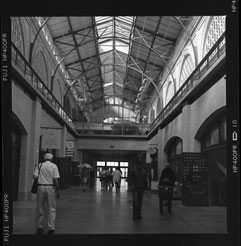
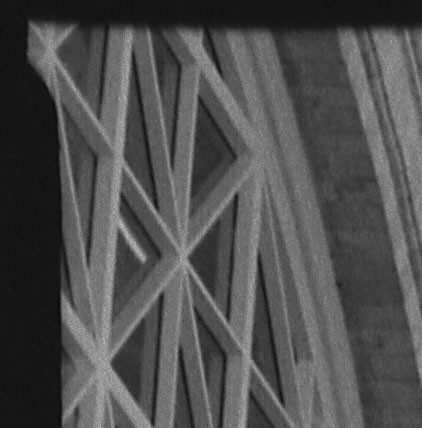
I bought a used Hasselblad 500 C/M last week. I took my first shots last week-end (this is my first medium format camera, and I had to learn how to load it and process 120 format roll film). Today I installed an Epson 3170 scanner capable of scanning medium format negatives (at the highest quality settings of 3200 dpi at 48 bits, this yields 52 megapixel files weighing 300MB each!). The quality is simply amazing, even more than you could expect with the 4x larger negative area than 35mm. Here is a preview scan of one of the shots (the inner marketplace courtyard, Ferry Building, San Francisco), and a 3200 dpi blow-up of the upper left corner of the frame:

Ferry building

Ferry building

Technical details: taken on 2003-10-24, Hasselblad 500 C/M, Carl Zeiss Planar 80mm f/2.8 CF, Fuji Neopan 400 processed in Ilford DD-X, exposure 1/250s at f/4.

Bombay Bits

The Economist once called Bombay “The most expensive slum in the world”. When I was a child, we used to fly to India every year, stopping for a day on the way there and back at my uncle’s place in the Khar district of that city, and I certainly agree with the characterization.

German cinematographer and photographer Lutz Konermann shows you can find beauty in that unlikeliest of places, in his collection called Bombay Bits.

P.S. Yes, I know the city was officially renamed “Mumbai” for political reasons by the extremist BJP party in power there, the way Madras was renamed “Chennai” and Poona became “Pune”. Here is an article debunking the controversy.

Inkjet printers revisited

In a recent post, I railed at the Inkjet racket. Lest I be perceived as doctrinaire, I do believe there are some good reasons to use inkjet printers, just that price is not one of them.

Here are the cases where I think an inkjet printer is preferable to Fuji Frontier or Noritsu prints on Fuji Crystal Archive paper:

Speed

There is no question sometimes speed matters, and the convenience is worth the price, specially if only proofs are required.

Black & white photography

Printing black and white photos on color materials usually leads to subtle, but discernible color shifts. Although Ilford makes a paper designed specifically for use in digital enlargers like the Lightjet, very few labs offer true B&W digital photo prints, the only one I know of is Reed Digital, using Kodak Portra BW RC paper. RC papers are not archival in any case.

Inkjet printers modified to use the PiezographyBW system can yield black and white photos that match or even exceed the quality of gelatin silver prints. If they use carbon pigment inks, they will be at least as archival (the carbon photographic printing technique is quite ancient and is considered one of the highest forms of photographic printing art, along with platinum printing).

More recently, Hewlett-Packard has introduced the No. 59 photo gray print cartridge for use with its Photosmart 7960 printer. This is a well-supported solution, unlike the finicky Piezography process, but unfortunately, it requires the swellable-polymer HP Premium Plus Photo paper to give decent durability, and is limited to Letter/A4 size. The drying time on swellable polymer paper ranges from a few hours to a day, taking away the immediacy of inkjet prints.

I compared prints made on Ilford Multigrade IV fiber base (baryta) B&W paper, Agfa Multicontrast Premium (resin-coated) B&W paper, Fuji Crystal Archive on a Lightjet, and the HP 7960 on both the glossy and matte HP Premium Plus Photo papers. The prints were compared under daylight conditions (overcast sky), under an incandescent (tungsten) light bulb, and under a compact fluorescent lamp. The results are summarized in the table below.

Color casts

Print paper used

Daylight

Tungsten

Fluorescent

Ilford MGIV FB

Neutral

Neutral

Neutral

Agfa RC

Slightly warm

Slightly warm

Neutral

Fuji Crystal Archive

Slightly blue

Neutral

Slightly purple

HP Premium Plus Photo

Strong Blue

Slight purple

Strong purple

The HP prints give better highlight detail than the Fuji, but fall short of the Agfa. The HP solution is not the silver bullet B&W aficionados were waiting for.

Update (2004-01-22):

The color cast seems to be an issue when the printer is new. After a few weeks of use, the ink cartridge “settles down” and seems far more neutral, better than the Lightjet print. It is not clear whether (1) this problem will reoccur with every new No. 59 cartridge, (2) or whether it was a defect in the cartridge I have, (3) or whether it only happens the first few days after a printer is put in service. As HP cartridges include the print head, I suspect it is option 1 or 2. This would increase the cost of the prints further by increasing waste, but the good news is, the grayscale output from the printer is competitive with the darkroom given the superior level of control you get from Photoshop, and this is the first mass-market printer that can really make this claim.

Matte prints

Unlike fiber papers, RC papers seldom have true matte finishes. The so-called “lustre” finish is in reality a process in which the surface of the paper is calendared (pressed by textured rollers) to imprint a pebble-grained finish, which is a mere ersatz of real matte photo paper. As this is not a microscopic finish, it diffuses light unevenly and when seen at an angle, the print is washed out by the reflections from the textured surface.

A printer like the Epson Stylus Photo 2100/2200 using pigmented inks can make durable and almost painterly prints on fine watercolor papers from the likes of Hahnemühle or Crane’s. Many fine art photographers favor this printer for that very reason.