Fazal Majid's low-intensity blog

Sporadic pontification

Fazal

The sad story of AIA Chasing

TL:DR Work-around for misconfigured HTTPS servers

This morning Temboz warned me that it had suspended The Oatmeal’s RSS feed due to too many errors. On further investigation, it turns out Temboz was getting these OpenSSL errors:

{'bozo': True,
 'bozo_exception': URLError(SSLCertVerificationError(1,
   '[SSL: CERTIFICATE_VERIFY_FAILED] certificate verify failed: unable
   to get local issuer certificate (_ssl.c:997)')),
 'entries': [],
 'feed': {'summary': ''},
 'headers': {}}

But oddly enough the site (and its RSS feed) were loading perfectly fine in Vivaldi, Firefox or Safari, and their certificate trust path displaying properly.

Trying to fetch the site directly using the openssl command-line tool revealed the root cause of the problem: the server is misconfigured and sending only the first certificate, not the full path.

zbuild ~/build>openssl s_client -connect www.theoatmeal.com:443 < /dev/null 
CONNECTED(00000003)
depth=0 CN = theoatmeal.com
verify error:num=20:unable to get local issuer certificate
verify return:1
depth=0 CN = theoatmeal.com
verify error:num=21:unable to verify the first certificate
verify return:1
depth=0 CN = theoatmeal.com
verify return:1
---
Certificate chain
 0 s:CN = theoatmeal.com
   i:C = US, O = "DigiCert, Inc.", CN = RapidSSL Global TLS RSA4096 SHA256 2022 CA1
   a:PKEY: rsaEncryption, 2048 (bit); sigalg: RSA-SHA256
   v:NotBefore: Jul 19 00:00:00 2022 GMT; NotAfter: Jul 21 23:59:59 2023 GMT
---
Server certificate
-----BEGIN CERTIFICATE-----
MIIHnjCCBYagAwIBAgIQDShn/5d79/AKJLby4Rc9BzANBgkqhkiG9w0BAQsFADBc
MQswCQYDVQQGEwJVUzEXMBUGA1UEChMORGlnaUNlcnQsIEluYy4xNDAyBgNVBAMT
... (elided for clarity) ...
jxgimUVPjChZSSpf5+wu9TdZDMTpdOneWsxgDJL6fzqJgw==
-----END CERTIFICATE-----
subject=CN = theoatmeal.com
issuer=C = US, O = "DigiCert, Inc.", CN = RapidSSL Global TLS RSA4096 SHA256 2022 CA1
---
No client certificate CA names sent
Peer signing digest: SHA256
Peer signature type: RSA
Server Temp Key: ECDH, prime256v1, 256 bits
---
SSL handshake has read 2644 bytes and written 448 bytes
Verification error: unable to verify the first certificate
---
New, TLSv1.2, Cipher is ECDHE-RSA-AES256-GCM-SHA384
Server public key is 2048 bit
Secure Renegotiation IS supported
Compression: NONE
Expansion: NONE
No ALPN negotiated
SSL-Session:
    Protocol  : TLSv1.2
    Cipher    : ECDHE-RSA-AES256-GCM-SHA384
    Session-ID: 50D50D930B6256AE492D1F764C2C873C6AFA6198BB4A8D544C57DC2B198E74B2
    Session-ID-ctx: 
    Master-Key: 034F81BED2AEB74AD5A7A145C3C36F2D94BFECEA4D58A87F24C8390F924E041E40CD7C9C7F480EDAA8573A1EDAA499B1
    PSK identity: None
    PSK identity hint: None
    SRP username: None
    TLS session ticket lifetime hint: 300 (seconds)
    TLS session ticket:
    0000 - e0 73 37 67 02 17 57 4e-f5 62 de 0a bd f7 2b 47   .s7g..WN.b....+G
    ...(elided for clarity) ...
    00b0 - 46 0a 22 1f 3e 4d 31 c8-92 3f ff 18 20 d8 b3 15   F.".>M1..?.. ...

    Start Time: 1663757669
    Timeout   : 7200 (sec)
    Verify return code: 21 (unable to verify the first certificate)
    Extended master secret: no
---
DONE

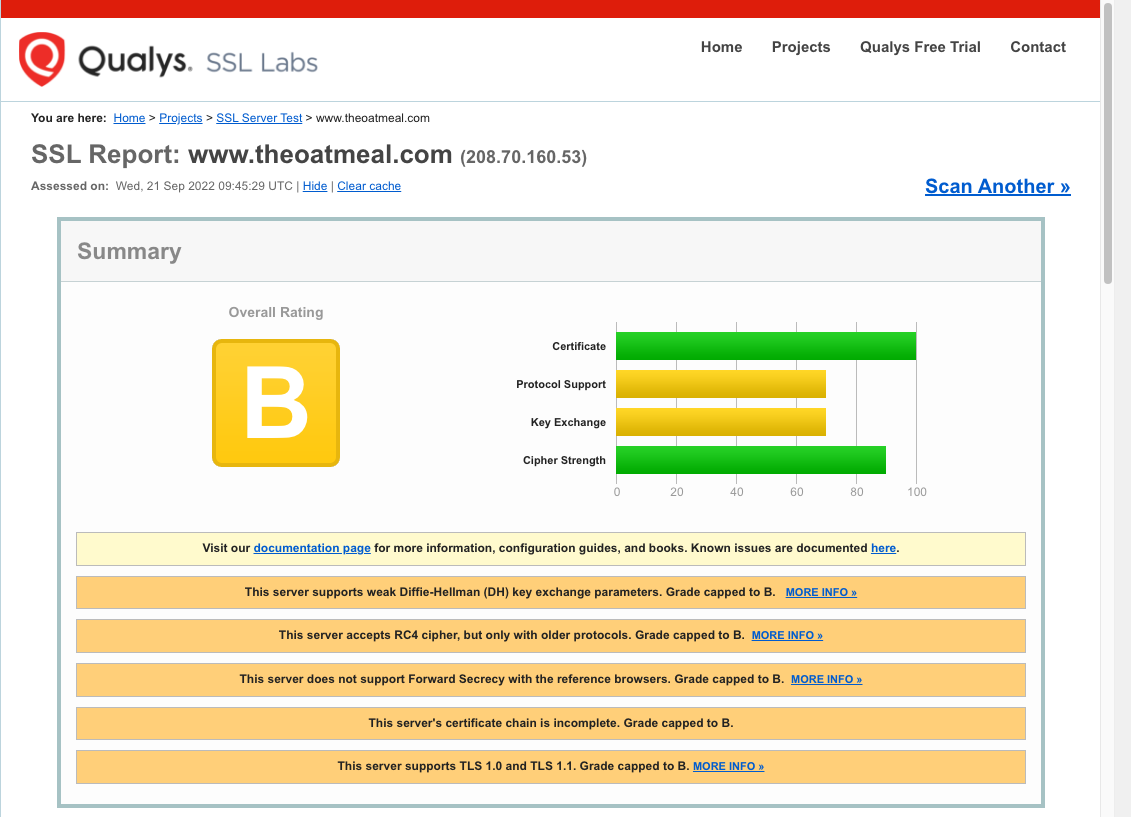
The certificate chain has only one certificate instead of the expected 3 (server, intermediate, root).

It’s not just a Python thing, curl compiled from source also fails, but the one shipped by Apple accepts it:

fafnir ~>/usr/local/bin/curl https://www.theoatmeal.com/
curl: (60) SSL certificate problem: unable to get local issuer certificate
More details here: https://curl.se/docs/sslcerts.html

curl failed to verify the legitimacy of the server and therefore could not
establish a secure connection to it. To learn more about this situation and
how to fix it, please visit the web page mentioned above.

fafnir ~>/usr/bin/curl https://www.theoatmeal.com/
<!DOCTYPE html>
<html lang="en">
<!--
    -\-                                                     
    \-- \-                                                  
     \  - -\                                                
      \      \\                                             
       \       \                                            
        \       \\                                              
         \        \\                                            
         \          \\                                        
         \           \\\                                      
          \            \\                                                 
           \            \\                                              
           \. .          \\                                  
            \    .       \\                                 
             \      .    \\                                            
              \       .  \\                                 
              \         . \\                                           
              \            <=)                                         
              \            <==)                                         
              \            <=)                                           
               \           .\\                                           _-
               \         .   \\                                        _-//
               \       .     \\                                     _-_/ /
               \ . . .        \\                                 _--_/ _/
                \              \\                              _- _/ _/
                \               \\                      ___-(O) _/ _/ 
                \                \                  __--  __   /_ /      ***********************************
                \                 \\          ____--__----  /    \_       I AM A MOTHERFUCKING PTERODACTYL
                 \                  \\       -------       /   \_  \_     HERE TO PTERO-YOU A NEW ASSHOLE
                  \                   \                  //   // \__ \_   **********************************
                   \                   \\              //   //      \_ \_ 
                    \                   \\          ///   //          \__- 
                    \                -   \\/////////    //            
                    \            -         \_         //              
                    /        -                      //                
                   /     -                       ///                  
                  /   -                       //                      
             __--/                         ///
  __________/                            // |               
//-_________      ___                ////  |                
        ____\__--/                /////    |                
   -----______    -/---________////        |                
     _______/  --/    \                   |                 
   /_________-/       \                   |                 
  //                  \                   /                 
                       \.                 /                 
                       \     .            /                 
                        \       .        /                  
                       \\           .    /                  
                        \                /                  
                        \              __|                  
                        \              ==/                  
                        /              //                   
                        /          .  //                    
                        /   .  .    //                      
                       /.           /                       
                      /            //                       
                      /           /
                     /          //
                    /         //
                 --/         /
                /          //
            ////         //
         ///_________////


-->

Apple uses its own Secure Transport library in curl, which must implement AIA because mainline curl still has AIA on its TODO as of 2021-09-21.

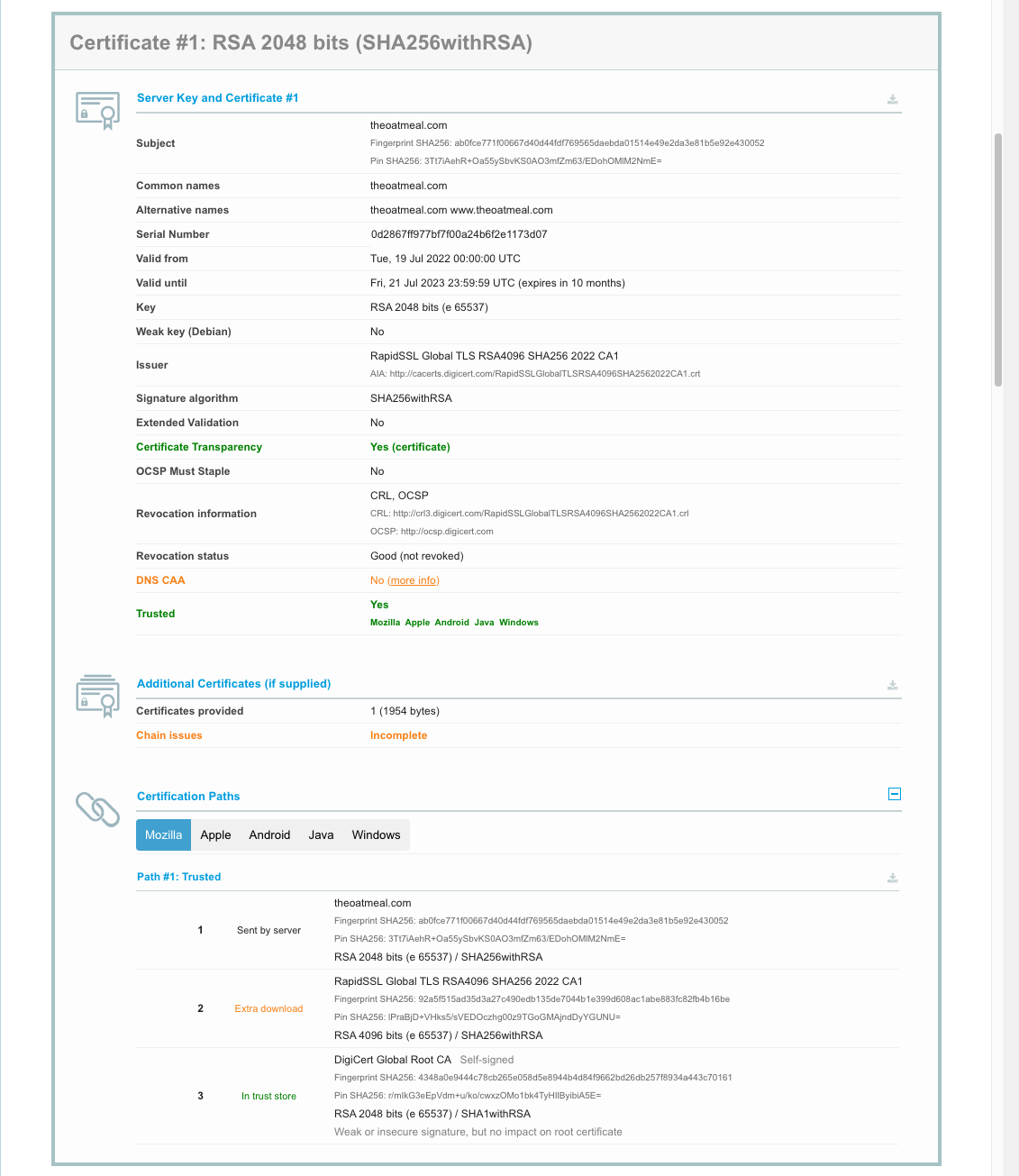
SSL Labs’ server test tool confirmed this:
So how do the browsers manage despite lacking the full chain? They use a work-around called Authority Information Access fetching (usually shortened to AIA fetching or AIA chasing). The server certificate has an optional X.509 field that has a URL to fetch the next certificate, in this case:

zbuild ~/build>openssl s_client -connect www.theoatmeal.com:443 < /dev/null | openssl x509 -text -noout
depth=0 CN = theoatmeal.com
verify error:num=20:unable to get local issuer certificate
verify return:1
depth=0 CN = theoatmeal.com
verify error:num=21:unable to verify the first certificate
verify return:1
depth=0 CN = theoatmeal.com
verify return:1
DONE
Certificate:
    Data:
        Version: 3 (0x2)
        Serial Number:
            0d:28:67:ff:97:7b:f7:f0:0a:24:b6:f2:e1:17:3d:07
        Signature Algorithm: sha256WithRSAEncryption
        Issuer: C = US, O = "DigiCert, Inc.", CN = RapidSSL Global TLS RSA4096 SHA256 2022 CA1
        Validity
            Not Before: Jul 19 00:00:00 2022 GMT
            Not After : Jul 21 23:59:59 2023 GMT
        Subject: CN = theoatmeal.com
        Subject Public Key Info:
            Public Key Algorithm: rsaEncryption
                Public-Key: (2048 bit)
                Modulus:
                    00:ad:01:37:58:d7:6a:f8:32:a0:26:c9:fd:8f:f3:
                    ... (elided for clarity) ...
                    7e:ef:cd:17:14:dc:55:d4:ff:a9:66:c4:96:57:02:
                    ca:a1
                Exponent: 65537 (0x10001)
        X509v3 extensions:
            X509v3 Authority Key Identifier: 
                F0:9C:85:FD:A2:9F:7D:8F:C9:68:BB:D5:D4:89:4D:1D:BE:D3:90:FF
            X509v3 Subject Key Identifier: 
                19:35:30:10:7D:D9:89:64:B5:A6:53:2C:76:6F:51:37:3B:2B:08:1C
            X509v3 Subject Alternative Name: 
                DNS:theoatmeal.com, DNS:www.theoatmeal.com
            X509v3 Key Usage: critical
                Digital Signature, Key Encipherment
            X509v3 Extended Key Usage: 
                TLS Web Server Authentication, TLS Web Client Authentication
            X509v3 CRL Distribution Points: 
                Full Name:
                  URI:http://crl3.digicert.com/RapidSSLGlobalTLSRSA4096SHA2562022CA1.crl
                Full Name:
                  URI:http://crl4.digicert.com/RapidSSLGlobalTLSRSA4096SHA2562022CA1.crl
            X509v3 Certificate Policies: 
                Policy: 2.23.140.1.2.1
                  CPS: http://www.digicert.com/CPS
            Authority Information Access: 
                OCSP - URI:http://ocsp.digicert.com
                CA Issuers - URI:http://cacerts.digicert.com/RapidSSLGlobalTLSRSA4096SHA2562022CA1.crt
            X509v3 Basic Constraints: 
                CA:FALSE
            CT Precertificate SCTs: 
                Signed Certificate Timestamp:
                    Version   : v1 (0x0)
                    Log ID    : AD:F7:BE:FA:7C:FF:10:C8:8B:9D:3D:9C:1E:3E:18:6A:
                                B4:67:29:5D:CF:B1:0C:24:CA:85:86:34:EB:DC:82:8A
                    Timestamp : Jul 19 17:18:02.819 2022 GMT
                    Extensions: none
                    Signature : ecdsa-with-SHA256
                                30:46:02:21:00:E8:D0:A9:EB:65:7D:19:73:9A:BC:F8:
                                0B:6D:30:FD:DB:47:83:79:D5:43:0C:92:00:1C:BF:E5:
                                E9:58:F2:B8:0E:02:21:00:8C:C1:69:33:FB:97:F4:E3:
                                A5:4A:8A:FD:AB:7E:E7:B9:17:0E:95:EF:BC:27:41:CE:
                                6C:EA:86:57:13:94:ED:C4
                Signed Certificate Timestamp:
                    Version   : v1 (0x0)
                    Log ID    : 35:CF:19:1B:BF:B1:6C:57:BF:0F:AD:4C:6D:42:CB:BB:
                                B6:27:20:26:51:EA:3F:E1:2A:EF:A8:03:C3:3B:D6:4C
                    Timestamp : Jul 19 17:18:02.762 2022 GMT
                    Extensions: none
                    Signature : ecdsa-with-SHA256
                                30:45:02:20:31:CC:04:98:48:B2:61:9C:66:7E:88:18:
                                06:08:30:72:E6:A7:F8:1C:9C:C6:65:BB:80:EF:41:F6:
                                E9:A3:3E:26:02:21:00:C6:3A:AB:5E:00:0C:DF:4B:E5:
                                70:39:3E:B6:2D:60:DF:9D:A0:DA:DE:A1:56:C4:87:D7:
                                49:EB:AF:BF:6F:3D:86
                Signed Certificate Timestamp:
                    Version   : v1 (0x0)
                    Log ID    : B3:73:77:07:E1:84:50:F8:63:86:D6:05:A9:DC:11:09:
                                4A:79:2D:B1:67:0C:0B:87:DC:F0:03:0E:79:36:A5:9A
                    Timestamp : Jul 19 17:18:02.824 2022 GMT
                    Extensions: none
                    Signature : ecdsa-with-SHA256
                                30:46:02:21:00:E3:D4:CF:BF:D0:8A:C5:BC:A6:28:F8:
                                49:87:75:F7:6B:A7:9B:21:7F:DB:6A:E6:69:C1:EC:D8:
                                F7:52:D7:4B:EA:02:21:00:E8:45:9A:7E:7E:2A:A6:EA:
                                64:96:60:95:1D:54:DE:2A:2F:3E:5F:25:C4:9E:02:2E:
                                0A:D1:6C:1F:93:17:51:EB
    Signature Algorithm: sha256WithRSAEncryption
    Signature Value:
        7d:35:f0:0a:96:36:17:4d:de:7b:95:14:5b:67:9d:b5:f5:27:
        ... (elided for clarity) ...
        60:0c:92:fa:7f:3a:89:83

In this case the browser will fetch http://cacerts.digicert.com/RapidSSLGlobalTLSRSA4096SHA2562022CA1.crt and recursively until it has the complete chain.

zbuild ~/build>curl -s --output - http://cacerts.digicert.com/RapidSSLGlobalTLSRSA4096SHA2562022CA1.crt | openssl x509 -text -noout | ggrep -A 2 "Authority Information Access:"
            Authority Information Access: 
                OCSP - URI:http://ocsp.digicert.com
                CA Issuers - URI:http://cacerts.digicert.com/DigiCertGlobalRootCA.crt

and http://cacerts.digicert.com/DigiCertGlobalRootCA.crt resolves to a root certificate with no AIA but in the trust store.

Since The Oatmeal’s site may not remain broken forever (I have reported the issue to Inman), I created a site https://aia.majid.org/ deliberately broken to not include a full certificate chain, for testing purposes.

The fetish for uptime

At one of my previous jobs, the engineers on my team had an informal competition as to who could rack up the longest uptime on their workstation (they all had Sun Solaris or Linux, of course). When the company moved to a new office, one crafty engineer managed to beat all the others by putting his Sun into the seldom-used hibernation mode to preserve his uptime when everyone else was forced to reboot.

I posit that uptime is actually a bad thing. All software has bugs, and a regular maintenance schedule to apply patches, at the very least once a month, should be part of the plan and designed into the architecture. By that token, an uptime greater than 31 days is a “code smell” for infrastructure.

PSA: iCloud Private Relay can make Safari on your iPad unusable

After upgrading my iPad to iPadOS 15.5, Safari became unusable. It would take forever to load the Reddit login page, and many others like Dilbert.com. Opening the same in Firefox Focus had no issues.

Going into Settings / Safari / Privacy & Security / Hide IP Address and disabling it fixed this for me. Alternatively you can disable it only for specific networks (Settings / Wi-Fi / ⓘ / Limit IP Address Tracing / Off).

It seems Apple turned on iCloud Private Relay on by default for Safari in iPadOS 15.5 and presumably iOS 15.5 as well. Macs are probably next.

I can only speculate why turning it off fixes the breakage, but:

  • The feature routes your calls through Akamai then CloudFlare, and for whatever reason CloudFlare doesn’t seem to like my ISP, I often encounter their “prove you are human” challenges.
  • It may also be because Apple overrides your DNS settings for this feature to work, and if your network is locked down with something like Pi-Hole to prevent trackers, those DNS requests may not be getting through. I don’t want IoT devices or the like to bypass my DNS server, which uses Wireguard to my Cloud VPN server to ensure my ISP cannot snoop on my DNS requests (a setup I believe more secure and private than Apple’s), nor CloudFlare, nor the UK Police State. I haven’t blocked DNS-over-HTTPS servers yet as this guy does but it’s on my list. This might be interfering with iCloud Private Relay.
  • It may also be sabotage, as Rui Carmo points out, or as John Oliver memorably calls it, “Cable Company F∗∗∗ery”.

Batch-converting HEIC images to JPEGs on the Mac

TL:DR working around Apple proprietary brain damage

I use Lightroom 6 to manage my photo collection, although it is falling victim to bit rot (e.g. the face recognition module no longer works, apparently due to a licensing logic time bomb in the code). Exploitative pay-forever software subscriptions are simply unacceptable so I will not yield to Adobe’s Creative Clout bondage, and since Lightroom will not work in newer versions of MacOS, that means I am working on migrating to Darktable, albeit very slowly.

My wife does all her photography on her iPhone, and while the image quality is poor, she does take a great many photos and videos of our daughter. I decided to integrate them in my workflow.

To do so, I installed the free and excellent Photobackup app on her iPhone. It allows backing up her photos and videos using rsync to my ZFS backup server, from which I rsync them to my Mac, and then use my linkonce tool to create a parallel file hierarchy that mirrors it, but so that when I delete a photo in Lightroom, it stays deleted. That way I can remove duds without having them pop back up in Lightroom every time I do a sync.

I just realized I was missing a large number of images because they are in Apple’s obnoxious HEIF format, that they switched to around the time they introduced the mostly useless Live Photos misfeature. Lightroom 6 does not recognize the format. While you can batch convert and export HEIC files to JPEG in Preview.app, it is still a manual process.

I investigated what command-line tools are available that could be run from a cron job and there are surprisingly few. GraphicsMagick sensibly refuses to support the format because of patent concerns. Most of the others require compiling an intimidating stack of dependencies first, and because HEIF is based on the H.265 HEVC video codec, an ostensibly open (in name only) ISO format that is heavily encumbered with patents, so is HEIF and it is probably illegal to use those tools like heic2jpeg.

I opted instead to write my own heic2jpeg (no relation to the previous tool). It is a very basic conversion utility using Apple’s CoreImage framework, to piggyback on Apple’s patent licenses, and as a side benefit, it will preserve the image metadata including geoloc. The flip side is that means the tool can only run on a Mac and not on Linux or Illumos, but I can live with that.

It is also my first ever Swift project. A nice expressive language in the vein of Python or Go (except with Apple’s grotesquely long API names), but I do not expect to use it much, as I have grown disillusioned with Apple’s policies and software quality, and have no intention of indenturing myself as a sharecropper in Tim Cook’s plantation any more than to Adobe’s.

The code is in heic2jpeg.swift

To build it, assuming Swift or Xcode is installed on your Mac, just run:

swiftc -O -o heic2jpeg heic2jpeg.swift

My sync script (part of my backup script) then runs something like:

find $HOME/Pictures -name \*.HEIC -print0 | xargs -0 -P 12 -t -n 10 heic2jpeg --delete

This will run 12 processes in parallel, consuming 10 files each until all HEIC are converted (or if already converted, left alone). I find the optimal setting to be 150% to 200% of the actual cores on your system (not including Intel’s fake hyperthreading cores, which do not count).

import Foundation
import CoreImage

var jpegQuality = 0.90
let context = CIContext(options: nil)
let options = NSDictionary(
    dictionary: [kCGImageDestinationLossyCompressionQuality:jpegQuality]
)
var delete:Bool
var filename:String?
delete = false
for i in 1..<Int(CommandLine.argc) {
    filename = CommandLine.arguments[i]
    if filename == "-delete" || filename == "--delete" {
        delete = true
        continue
    }
    let srcURL = URL(fileURLWithPath:filename!)
    let destURL = srcURL.deletingPathExtension().appendingPathExtension("jpg")
    var exists:Bool
    do {
        exists = try destURL.checkResourceIsReachable()
    } catch {
        exists = false
    }
    if exists {
        print("skipping \(filename ?? "???")")
    } else {
        print("converting \(filename ?? "???")")
        let image = CIImage(contentsOf: srcURL)
        try! context.writeJPEGRepresentation(
            of:image!,
            to:destURL,
            colorSpace: image!.colorSpace!,
            options:options as! [CIImageRepresentationOption : Any]
        )
        if delete {
            print("deleting \(filename ?? "???")")
            try! FileManager.default.removeItem(at:srcURL)
        }
    }
}

How to ensure a cron job runs exclusively

TL:DR a simple but effective mutex for cron jobs

Often you need to run a job periodically, e.g. backing up files, but the job could take more time than the interval allotted between runs, and you do not want multiple instances of the process to be running at the same time. For instance, bad things happen when multiple rsync processes are trying to synchronize the same folders to the same destination. Thus you want a mutex, something that ensures only one copy of the process can run at any given time.

There are approaches using lock files, but if the computer reboots or the job crashes, the lockfile will not be deleted and all subsequent runs of the job will fail. Some advocate using flock() or fcntl(), but those calls are finicky with strange semantics, e.g. fcntl will release a lock if any related process closes the file.

My solution to deal with this is to bind an IPv6 localhost ::1 socket to a given port. Only one process can do this, and thus it’s a very effective mutex. No lock files to cause havoc, no dealing with the dark and buggy corners of advisory file locking.

For shell scripts, simply replace the #!/bin/sh with #!/somewhere/bin/lock 2048 where 2048 is the port number you will use to enforce the lock (greater than 1024 if you do not want to deal with the hassles of privileged ports). If you want the jobs to wait and not exit immediately if they fail to acquire the lock, just change the line to #!/somewhere/bin/lock w2048

The code is in lock.c. Just compile using:

gcc -O2 -o lock lock.c

or

clang -O2 -o lock lock.c.

#include <unistd.h>
#include <sys/types.h>
#include <sys/socket.h>
#include <stdlib.h>
#include <stdio.h>
#include <errno.h>
#include <netinet/in.h>
#include <inttypes.h>
#include <sys/time.h>
#include <string.h>

extern char **environ;

int main(int argc, char **argv) {
  int sock, port, status, exit_on_fail;
  char *port_start, *port_end = NULL;
  struct sockaddr_in6 sin6;
  struct timeval timeout;

  if (argc < 3) {
    fprintf(
      stderr,
      "Usage:\n"
      "\t#!%s [w]<port:1-65535> (first line of script instead of #!/bin/sh)\n"
      "\t\tor\n"
      "\t%s [w]<port:1-65535> -c \"cmd [args...]\"\n\n"
      "\tw: wait if we could not get the port\n",
      argv[0], argv[0]);
    return -1;
  }
  
  exit_on_fail = 1;
  port_start = argv[1];
  if (port_start[0] == 'w') {
    exit_on_fail = 0;
    port_start++;
  }
  port = strtol(port_start, &port_end, 10);
  if (port_end != port_start + strlen(port_start)) {
    printf("port %s invalid format, must be integer between 1 and 65535\n",
           port_start);
    return -2;
  }
  if (port < 1 || port > 65535) {
    printf("port %d invalid, must be between 1 and 65535\n", port);
    return -3;
  }

  sock = socket(PF_INET6, SOCK_DGRAM, IPPROTO_UDP);
  if (sock == -1) {
    perror("could not create socket");
    return -4;
  }

  sin6.sin6_family = AF_INET6;
  sin6.sin6_port = htons(port);
  sin6.sin6_addr = in6addr_loopback;

  status = -1;
  while (status < 0) {
    status = bind(sock, (const struct sockaddr *) &sin6, sizeof(sin6));
    if (status < 0) {
      if (exit_on_fail) {
        /* perror("could not bind socket"); */
        return -5;
      }
      timeout.tv_sec = 1;
      timeout.tv_usec = 0;
      /* fputs("sleeping...\n", stderr); */
      select(0, NULL, NULL, NULL, &timeout);
      
    }
  }
  /* default to /bin/sh if no args are supplied, so we can do something like:
     #!lock 2048
     instead of
     #!/bin/sh
  */
  argv[1] = "/bin/sh";
  execvp("/bin/sh", &argv[1]);
}