Posts

Content is not king, and what to do about it

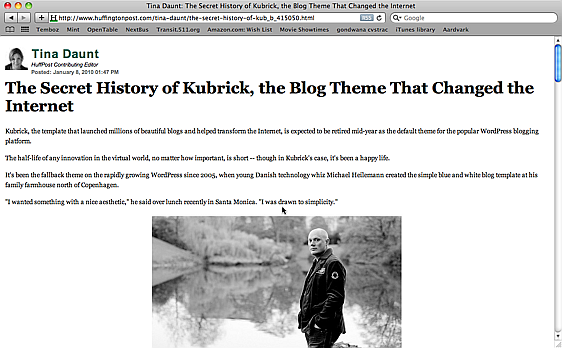
As this screen shot from the Huffington Post demonstrates. On my MacBook Air (1280×800) I can’t even see the complete headline (highlighted in red). On my office PC (1280×1024) I can see the headline and a smidgen of text. All in all, the content occupies barely 5% of the browser window…

Advertising is not to blame, as it only takes up 12% of the real estate. The rest is hypertrophied navigation, chartjunk, wasted space, blegs and other come-hithers. Horrors like these are what make the Aardvark extension/bookmarklet essential. A few seconds with it yield this much improved result:

An even better option in this case is the Readability bookmarklet, which requires zero work, but may not work in all cases.

On a completely unrelated note, I highly recommend Andy Odlyzko’s paper (PDF) of the same title.

Beware modest proposals taken literally

Benjamin Franklin is the most significant of America’s Founding Fathers. During his stay in Paris as ambassador of sorts for the fledgling United States, he was the 18th century equivalent of a rock star, complete with female groupies throwing themselves at him. They clearly had superior taste to our own century, obsessed as it is with reality show nobodies and pop-music histrions who can’t sing for the life of them, but I digress. Franklin convinced the French public and king Louis XVI to financially support the US, bankrupting the kingdom and ultimately leading to the French Revolution. The revolutionary Assembly granted honorary citizenship to Franklin (along with others like Tom Paine and George Washington) and even a seat in the assembly itself.

My opinion of Franklin was lowered when I learned that he was the one who first proposed the abomination that is Daylight Saving Time. I only recently found out that An Economical Project was in fact a satire much like his notorious opus Fart Proudly, a point that seems to have been completely escaped the proponents of DST.

It could have been worse, I suppose. They could have adopted Swift’s A Modest Proposal instead.

Panasonic GF1 first impressions

I bought a Panasonic DMC-GF1 compact large-sensor camera in a kit with a small 20mm f/1.7 pancake lens on Monday to replace my Sigma DP2 as my everyday pocket (well, jacket pocket) camera. While the 17.3x10mm micro four thirds sensor is nowhere near as large as the full-frame 36x24mm sensors on my Canon 5DmkII or Leica M9, an APS-C sensor like the one on the upcoming Leica X1, or even the 20.7×13.8mm Foveon X3 sensor in the DP2, the big draw in the GF1 is its excellent responsiveness, as the autofocus and autoexposure lag in the DP2 is that otherwise excellent camera’s Achille’s heel.

The GF1 has been extensively reviewed elsewhere, technically by DPReview and hands-on by Craig Mod, and if you are interested in this camera I encourage you to read those very thorough reviews. I will not attempt to duplicate them here. Here are just salient observations from using this camera that I have not seen elsewhere:

  • The image preview mode is deceptive. At the maximum 16x magnification, pictures appear far worse on screen than they really are. I can only assume the interpolation algorithms used are terrible. The camera’s review mode is useless for editing images or rejecting poor ones in the field, you have to return to your computer to get an assessment on critical focus.
  • The orientation sensor is inexplicably part of the lens, not the body. The 20mm pancake does not include one. Even Canon’s cheapest digital Elphs or Rebels include an orientation sensor, its absence in a $900 camera kit is inexcusable.
  • In program mode, the camera seems to always select f/1.7, even when lower apertures with more reasonable depth of field are available.

Broken SPF records

I have SPF verification enabled on my mail server. While SPF is no panacea for the problem of spam, it is quite effective at ensuring spammers do not forge the sending address to impersonate someone else, and cause some poor innocent soul to receive in a boomerang effect the torrent of complaints hurled at them.

Unfortunately far too many lame organizations (cough, Google) qualify their SPF record using a too permissive ?all or ~all clause, which means they have servers other than those listed, and thus their SPF record is useless for filtering purposes.

In the last month, I noticed the opposite problem: I did not receive emails from Eurostar and BookMooch because their SPF records did not list the mail servers they actually use. If they are not clueful enough to manage a simple list of IP addresses, or have basic change management discipline, they should do us all a favor and ditch the SPF record they clearly are incapable of maintaining.

Withings scale

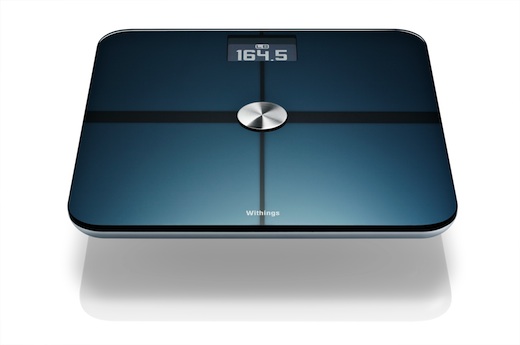
I received today a Withings networked body scale. This gizmo measures your weight and estimates body fat ratio using an impedance bridge, and uploads it over WiFi to their web server, where you can watch trends and monitor your progress. The scale itself is quite thin and elegant, quite unlike my older Tanita scale. The top is glass with a metallic underlay that makes it look like a large slab of photovoltaic cell. It runs off 4 AAA batteries, they must use a remarkably power-efficient microcontroller.
withings

Since there is no UI on the device, you hook it up to your computer via a USB cable, and the installer (available for Mac and Windows) will upgrade the firmware, set up the WiFi access point and authentication parameters, and associate the scale with the account you created on the Withings website. That’s pretty much it, the process is very smooth.

Using it is simplicity itself — just step on the scale (there is no clunky recalibration scheme unlike my Tanita). The weight measure is near instant and shown on a very legible backlit LCD display that is far easier on the eyes than Tanita’s thin numerals. A progress bar starts as the bridge measures your body impedance (used to estimate body fat content) and in a few seconds the process is complete and the results uploaded. It can track multiple users as long as their weights are not within half a kilo of each other. The user interface uses more Flash than I would like, but is perfectly serviceable, there is also a free iPhone app and a JSON-based API to access the data.

I paid $159 for it on Amazon. Considering the amount of technology and design that went into the product, it is relatively inexpensive.

After using it and trying to find out more about the company, I realized it is French and the CTO, Frédéric Potter, was in my alma mater the class before mine. It’s always great to see innovative startups thriving, and I hope there are more connected devices forthcoming. I’d love to see WiFi-enabled thermometers, power meters and remote power switches using the technology.